

HaruVista icon
HaruVista icon

HaruVista

 Like

HaruVista is a desktop calendar for Windows built around readable text. Instead of zooming the whole window, it enlarges only the event text in the calendar grid, in seven sizes, so the side panel stays the same size and the same number of events fit on screen.
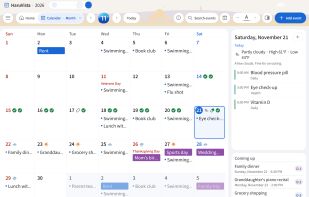
Month view with large event text and the day panel (sample data)

Cost / License

  • Pay once
  • Proprietary

Application type

Since

  • New

Platforms

  • Windows
0likes
0articles
Save

Features

Properties

Features

Highlights All activities

HaruVista News & Activities

Recent activities

HaruVista information

  • Developed by

    KR flagTinyStar Labs
  • Licensing

    Proprietary and Commercial product.
  • Pricing

    One time purchase (perpetual license) that costs $8.
  • Alternatives

    2 alternatives listed
  • Badge

    Get an embeddable badge for HaruVista
  • Supported Languages

    • English
    • Korean
    • Japanese
    • German
    • French
    • Spanish
    • Chinese

AlternativeTo Category

Office & Productivity
HaruVista was added to AlternativeTo by TinyStarLabs on and this page was last updated .

No comments or reviews, maybe you want to be first?

Official Links

What is HaruVista?

HaruVista is a desktop calendar for Windows built around readable text. Instead of zooming the whole window, it enlarges only the event text in the calendar grid, in seven sizes, so the side panel stays the same size and the same number of events fit on screen. The developer made it after presbyopia set in and Windows Mail and Calendar was retired.

  • Multiple Google accounts plus Outlook, Microsoft 365, iCloud and NAVER calendars, each on its own account card
  • Two-way task sync with Microsoft To Do and Google Tasks; tasks can be edited in Week view
  • Title filters for busy shared calendars: show only events whose titles contain your name or other keywords
  • Join buttons for Zoom, Google Meet and Teams meetings, from ten minutes before they start
  • One-line entry such as "tomorrow 3pm dentist", drag to move events, undo, and deleted events kept for a year
  • Medication reminders answered from the Windows notification, with a dose record for the last 7, 30 or 90 days
  • Public holidays for 14 countries and regions shown offline, plus yearly lunar dates and birthdays
  • Touchpad pinch to move between multi-month, month, week and Home views
  • Print a month on one large-text page or save it as PDF; .ics import and export
  • No server of its own, no ads and no usage tracking; it works without any account
  • Eight languages, light and dark themes, Windows contrast themes

Paid, one-time purchase after a 30-day free trial. When the trial ends, events stay viewable and reminders keep working; editing needs the purchase. Requires Windows 10 version 2004 or later, or Windows 11, on x64 or ARM64.