G
G

GUI for DISM

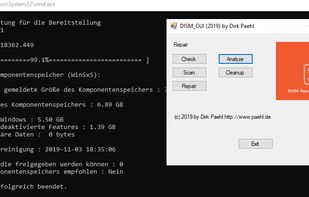
Check corresponds to the command CheckHealth - Checks whether there is a component memory corruption.
GUI for DISM screenshot 1

Cost / License

  • Free
  • Proprietary

Platforms

  • Windows

Features

No features, maybe you want to suggest one?

 Tags

GUI for DISM News & Activities

Highlights All activities

Recent activities

No activities found.

GUI for DISM information

Popular alternatives

View all
GUI for DISM was added to AlternativeTo by azumukupoe on and this page was last updated .
No comments or reviews, maybe you want to be first?

What is GUI for DISM?

Check corresponds to the command CheckHealth - Checks whether there is a component memory corruption. Scan corresponds to the command ScanHealth - Here errors are searched for, but not corrected yet. Repair corresponds to the command RestoreHealth - Here errors are search for and automatically repair if possible. (Currently only local check (WinSxS folder) and correction Analyze - Corresponds to the analyzecomponentstore command. Here the component memory is checked, whether memory space can be released. Cleanup - Corresponds to the StartComponentCleanup command. The component store is cleaned.

Install Cab: It's possible to install cab files Repair offline, you need the install.wim from the ISO for your current Windows version (not an older or newer)

