




Gramax
8 likes
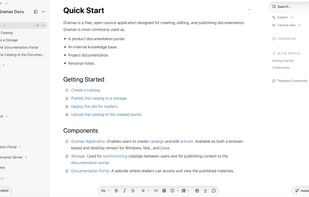
Open-source, self-hosted alternative to GitBook and Confluence: a WYSIWYG editor over Markdown files in your own Git repository, with a documentation portal.

Cost / License
- Free
- Open Source (GPL-3.0)
Application typeApplication types
Since
- Since 2025
GitHub
- GitHub stars: 628


Features

Highlights All activities
Gramax News & Activities
Recent activities
 Olesya-Andreeva added Gramax as alternative to Document360, Confluence, Wiki.js and BookStack
- Olesya-Andreeva updated Gramax
- Olesya-Andreeva liked Gramax
- Olesya-Andreeva updated Gramax
Key Pros:
-
Visual Markdown editor: Combines the simplicity of Markdown with a WYSIWYG interface, making it accessible to both technical and non-technical users.
-
Local-first and open-source: All files are stored locally in plain Markdown, ensuring full data ownership, offline access, and no vendor lock-in.
-
Seamless Git integration: Connects directly to GitHub, GitLab, Bitbucket, and Gitea for robust version control and team collaboration.
-
Built-in documentation portal: Publishes...
-
- shakdv A comment was removed from Gramax
- Dmitry-Shakhlin added AI-Powered as a feature to Gramax
- shakdv liked Gramax


Developed by
Gram-axLicensing
Open Source (GPL-3.0) and Free product.Written in
Alternatives
32 alternatives listedBadge
Get an embeddable badge for GramaxSupported Languages
AlternativeTo Categories
Development, Office & Productivity, Remote Work & EducationGitHub repository
- 628 Stars
- 29 Forks
- 128 Open Issues
- Updated


Comments and Reviews
Key Pros:
Visual Markdown editor: Combines the simplicity of Markdown with a WYSIWYG interface, making it accessible to both technical and non-technical users.
Local-first and open-source: All files are stored locally in plain Markdown, ensuring full data ownership, offline access, and no vendor lock-in.
Seamless Git integration: Connects directly to GitHub, GitLab, Bitbucket, and Gitea for robust version control and team collaboration.
Built-in documentation portal: Publishes catalogs as a customizable website, with self-hosted (Docker) or static site deployment options.
Advanced editing features: Supports diagrams (Mermaid, BPMN, Drawio, PlantUML), OpenAPI descriptions, tabs, tables, and multimedia embeds.
Cross-platform availability: Works as a desktop app on Windows, macOS, and Linux, as well as in the browser.
Free migration from Confluence and Notion: Imports existing content while preserving formatting and hierarchy.
Active development and thoughtful updates: Continuous improvements to comment review, change history, diagram resizing, and export options.
Multilingual documentation support: Create content in 17 languages, including English, Spanish, and more.
Completely free and self-hostable: No licensing costs, with full control over hosting and infrastructure.