


Goxel
24 likes
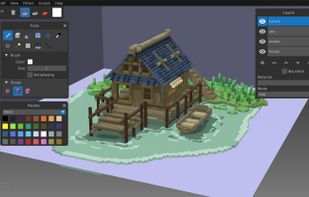
Simple, but powerful voxel graphic editor with 24-bit color support, unlimited scene size and undo buffer, layers and much more.

Cost / License
- Free
- Open Source (GPL-3.0)
 EU
EUPlatforms
- Mac
- Windows
- Linux
- BSD


Features
Highlights All activities
Goxel News & Activities
Recent activities

Developed by
 Guillaume Chereau
 Licensing
Open Source (GPL-3.0) and Free product.Written in
Alternatives
21 alternatives listedBadge
Get an embeddable badge for GoxelSupported Languages


The linux setup for everyone (freeware with GUI only and distro recommendations)
THIS LIST HAS BEEN DELETED DUE TO A BUG, SO IT MISSES SOME HONORABLE MENTIONS !
I've been using Linux for a year now. I do use CLI tool and the terminal but I'm super used to GUI and I do understand why you might don't want to bother with Terminal and stuff ! Here is my list of useful tools for beginners on Linux !
The same list for
macOS :
Windows 10 :


Powerful Open Source Creative Softwares
Ever wondering about free great open source software to start your idea? Here's a list for you to get started.
Also mentions several rarely known and newer software as well!
Please note that almost none of these alternatives are 1-to-1 replacement with exact some features. Most of these software might have entirely different scope of project.
Notable event: Libre Graphics Meeting, annual meeting on Free/Libre and Open Source software for graphics.
https://www.libregraphicsmeeting.org
Cover image by David Revoy (CC-BY 4.0) https://www.davidrevoy.com/article1061/cmyk-support-in-inkscape-could-be-a-game-changer-for-professional-print-designers

Freedom-Respecting Apps for Creatives
Like my previous list, this is to help people switch to Linux and Open Source. This time, the focus is on creative professionals and hobbyists: artists, musicians, writers, etc.
Not all apps and services listed will be open source or even free (as in free beer), but they will at the very least be either freedom-respecting or non-subscription-based. The simple rule is: once it requires an account (email, phone number, etc.) to use it, then it will be placed after the ones I actually recommend.
Of course, there will be a few exceptions, but these are ONLY to point out that even big, well-known software is available on Linux as well. These exceptions will be at the end of each section.
Each section lists my recommendations in order of best (in my opinion) to good enough. In most cases, proprietary and non-freedom-respecting app/services will be last in each category, except for Obsidian, which is proprietary but respects your freedom and privacy. If you don't like my choices, click on the app to search for alternatives right here on this website. Convenient.
Note: This list was originally started as an unfinished thread I was writing. A very long one that goes into more than just alternatives, but also why you should use them — like protecting democracy and freedom, how your tax dollars should be spent, how important open source is in our digital age, etc.
Here is that unfinished thread: https://forum.endeavouros.com/t/wip-how-to-tell-if-you-can-switch-to-linux-software-alternatives/58912#p-574301-creators-31
Lastly, the Linux operating systems (or distros) are at the end of the list because no matter which you choose, the majority of these apps can be installed on Windows, and can certainly be installed on any of the distros.

No comments or reviews, maybe you want to be first?