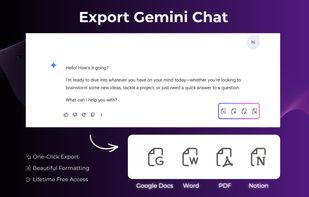
Export Gemini is a reliable Gemini exporter that turns your Gemini chats into clean, shareable files in seconds. Instead of copy-and-paste chaos, you can export exactly what you need — a selected Gemini conversation or your entire chat history — and save it as PDF, Word (DOCX), Google Docs, or Notion. Before exporting, you can also set your preferred font, font size, and text color so the final document looks professional and consistent. If you're looking for how to export Gemini chat, how to export Gemini chat history, or a reliable Gemini-to-PDF Chrome extension and Gemini-to-Word converter, this Gemini exporter is built to make the process fast, readable, and repeatable.
KEY FEATURES ?
GEMINI TO WORD
? Use this Gemini exporter to save conversations as editable Word documents...
? Cleaner layout than copy/paste: headings, paragraphs, code blocks, and lists are preserved as readable text.
? Great for proposals, reports, SOPs, emails, and content drafts.
EXPORT GEMINI TO PDF
? Export Gemini chat to PDF for sharing, printing, archiving, or compliance.
? Use it as a gemini to pdf saver for important chats and decisions.
? Works great when you need export gemini conversation to pdf with consistent fonts and spacing.
? Supports common “gemini to pdf converter” needs without manual formatting.
EXPORT TO GOOGLE DOCS
? Export Gemini chat to Google Docs to co-edit with your team.
? Ideal for content planning, meeting notes, and approvals.
? Perfect when you want export gemini chat to google docs instead of downloading files.
GEMINI TO NOTION
? Send your Gemini chat into a Notion page for knowledge base building.
? Great for project documentation, product research, and team playbooks.
? Optimized for “gemini to notion” workflows.
EXPORT SELECTED OR FULL HISTORY
? Choose ONE conversation (selected messages) or export the full chat thread.
? Turn messy scrolling into a structured “export gemini chat history” file.
? Helpful for saving transcripts, decisions, prompts, and outcomes.
STYLE SETTINGS BEFORE EXPORT
? Set font family, font size, and text color for your output.
? Create templates for different audiences (client-ready, internal notes, academic format).
? Keep exports consistent across Word, PDF, and document tools.
USE CASES 🎯
No matter your workflow, this Gemini exporter fits into how you already work:
? Writers & marketers: save drafts, outlines, and content briefs from Gemini to Word for editing.
? Sales & support: export conversations for follow-ups, onboarding docs, and handover notes.
? Students & researchers: export Gemini chat history to PDF as study material and citations.
? Product teams: move decisions into Google Docs or Notion and keep everything searchable.
? Consultants & freelancers: deliver polished Word/PDF outputs to clients in minutes.







 Ankit-7357 added Gemini Exporter as alternative to Carry
 Sulfurbyte added Gemini Exporter as alternative to Superpower for Gemini
 Backrun added Gemini Exporter as alternative to AI Chat Exporter Extension
 Backrun added Gemini Exporter as alternative to Google Gemini


 Backrun
No comments or reviews, maybe you want to be first?