30+ power-user features for Google Gemini. Folders, export, prompt optimizer, shortcuts, and more.
The best Extension for Google Gemini™ AI. Native Folders, Daily Limit Counter, Export (PDF/DOCX), Message Queue and Prompt Library.
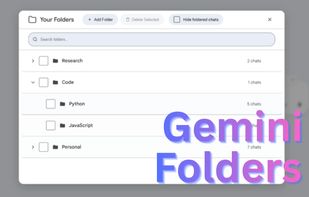
🚀 TOP FEATURES 📂 Chat Folders & Sidebar Manager: Create custom folders to organize conversations by project, topic, or client. ?? Modular Control: Toggle every feature on or off to create your perfect interface. 🗑? Trash Bin: Restore accidentally deleted chats. 📊 Daily Limit Counter (Thinking & Pro Models) ? Smart Message Queue: Queue multiple messages while Gemini generates—they send automatically in sequence. ? One-Click Prompt Optimizer: Instantly upgrade prompts using advanced prompt engineering. 📚 Prompt Library & Quick Actions: Save, organize, and reuse your best prompts with custom quick-action buttons. 🔗 Prompt Chains: Create multi-step prompt workflows that execute in sequence automatically. ? Bulk Actions: Select multiple chats to Bulk Delete, Bulk Export, or move them to folders instantly. ?? Slash Commands: Type // to instantly search and insert saved prompts. 💾 Universal Export (PDF, DOCX, TXT): Export chats individually or in bulk. 📌 Pinned Chats Dropdown: Quick-access menu for your most important conversations. 📊 Input Counter: Real-time word and character count above the input field. ?? Quick Navigation: Floating scroll controls to jump to the top or bottom instantly. 🎨 UI Declutter: Hide distracting elements like the Gems gallery, activity section, and more. 🔊 Download Audio: Download AI responses as audio files. ?? Keyboard Shortcuts: Power-user shortcuts for faster navigation. 🕒 Message Timestamps: (Experimental) See the exact date and time for every message. 🌚 Theme Support: Fully supports Gemini's Dark and Light modes.
💎 PRO EXCLUSIVES: 🔗 Chat Referencing: Drag and drop previous chats directly from the sidebar into your input box to use as context. 🛠? Custom Optimizer Prompts ?? Google Drive Sync: Securely sync all your folders and saved prompts using your own private Google Drive.






 EU
EU


 Ankit-7357 added Superpower for Gemini as alternative to Carry
 Sulfurbyte added Superpower for Gemini as alternative to AI Chat Exporter Extension
 Sulfurbyte added Superpower for Gemini as alternative to Gemini Exporter
 Sulfurbyte added Superpower for Gemini as alternative to Gemini Toolbox


 Sulfurbyte
No comments or reviews, maybe you want to be first?