Fuse Caption Studio is the privacy-first AI captioning studio built exclusively for macOS.
Most captioning tools force you to upload large video files to the cloud, risking your privacy and wasting hours on upload/download times. Fuse Caption Studio solves this by running the world’s best transcription models (Whisper via CoreML) directly on your Mac’s Neural Engine.
100% Offline & Private, your video and audio files never leave your device. Whether you are working on an NDA-protected project, personal footage, or just have slow internet, Fuse works instantly without a connection. No servers, no data collection, no waiting.
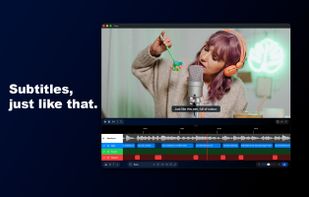
Visual Timeline Editor unlike other transcribers that only offer a text editor, Fuse Caption Studio provides a video-first timeline. See your subtitles as blocks on a timeline with a waveform (similar to Final Cut Pro), giving you frame-perfect control over timing and duration.
Key Features:
- On-Device AI: Powered by Whisper for blazing-fast performance without draining your battery.
- Burn-In Subtitles: Export videos with your captions "baked in," ready for TikTok, Instagram Reels, and YouTube or Shorts.
- Custom Styling: Full control over fonts, colors, alignment and more to match your brand.
- Multi-Format Export: Export as .SRT, .VTT, .TXT, or render directly to several video formats, like .MP4, .MOV...
- Multi-Language Support: Automatically detect and transcribe audio in multiple languages (Large model required) with high accuracy.
- Native Experience: A lightweight, native Swift app that feels at home on macOS—no clunky web wrappers or Electron bloat.
Who is Fuse Caption Studio for?
- Content Creators: Add viral-style captions to social clips in seconds.
- Video Editors: Generate .SRT files for Premiere/Final Cut Pro without paying for cloud subscriptions.
- Journalists & Researchers: Transcribe sensitive interviews securely offline.
Stop renting your captions. Start owning your workflow with Fuse Caption Studio.




 Mauricio B. Holguin added Fuse Caption Studio as alternative to Overcaption
 Paul added Fuse Caption Studio as alternative to OpenSub
 Paul added Fuse Caption Studio as alternative to F-captions

 Fuse Labs


No comments or reviews, maybe you want to be first?