
FTPeach icon
FTPeach icon

FTPeach

FTPeach is a free, open-source file transfer client for Windows 10 and 11. It supports FTP, FTPS (explicit TLS), SFTP and WebDAV, and shows local and remote folders side by side in two panes, with a tab for each connection.
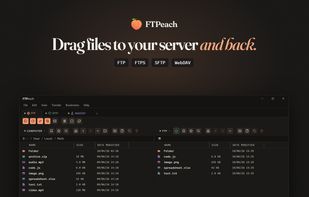
Drag files to your server and back

Cost / License

Platforms

  • Windows
0likes
0articles
Save

Features

Properties

  1.  Lightweight
  2.  Privacy focused

Features

  1.  Dark Mode
  2.  No registration required
  3.  Portable
  4.  Ad-free
  5.  No Tracking
  6.  Works Offline
  7.  Support for SFTP
  8.  Auto Update
  9.  Drag and Drop
  10.  WebDAV Support
  11.  Dual Pane Support
  12.  Master Password
  13.  Multiple languages
  14.  Support for Windows Hello
  15.  Tabbed interface
  16.  SSH
  17.  Resume interrupted downloads
  18.  Tabbed browsing
  19.  Remote File Access

FTPeach News & Activities

Highlights All activities

Recent activities

FTPeach information

  • Developed by

    RU flagLeonid Lozovskii
  • Licensing

    Open Source (Apache-2.0) and Free product.
  • Written in

  • Alternatives

    22 alternatives listed
  • Badge

    Get an embeddable badge for FTPeach
  • Supported Languages

    • English
    • German
    • Spanish
    • French
    • Italian
    • Portuguese
    • Dutch
    • Danish
    • Swedish
    • Polish
    • Czech
    • Hungarian
    • Romanian
    • Turkish
    • Greek
    • Ukrainian
    • Russian
    • Arabic
    • Hebrew
    • Hindi
    • Thai
    • Vietnamese
    • Indonesian
    • Japanese
    • Korean
    • Chinese

AlternativeTo Categories

File Sharing, File Management, Network & Admin, OS & Utilities

GitHub repository

  •  12 Stars
  •  0 Forks
  •  0 Open Issues
  •   Updated  
View on GitHub
FTPeach was added to AlternativeTo by Leonid Lozovskii on and this page was last updated .

No comments or reviews, maybe you want to be first?

Official Links

What is FTPeach?

FTPeach is a free, open-source file transfer client for Windows 10 and 11. It supports FTP, FTPS (explicit TLS), SFTP and WebDAV, and shows local and remote folders side by side in two panes, with a tab for each connection.

Drag files between panes to upload or download them, or copy files from one server to another through your computer. The transfer queue runs several transfers at once and lets you pause or cancel any of them or set a speed limit. Interrupted downloads resume on every protocol, and interrupted uploads resume on FTP, FTPS and SFTP. You can open a remote file in your own editor, and FTPeach uploads your changes back when you save.

Saved passwords are encrypted for your Windows account by default. You can instead keep them in a vault protected by a master password and unlock it with Windows Hello. For SFTP, FTPeach asks you to confirm a server's key before the first connection and warns you if the key changes.

Other features:

  • Saved connections (bookmarks)
  • Light and dark themes
  • Interface in 27 languages
  • Portable version: settings and passwords stay in a folder next to the program
  • Automatic updates with signature checks
  • No account, no tracking, no ads

FTPeach is in pre-release. It was made with a lot of help from AI and has been tested carefully, but please back up files that matter to you.
