

FreeTabs icon
FreeTabs icon

FreeTabs

 Like

FreeTabs puts every Chrome window on one board. Lasso the tabs you're done with into a folder and they close once each one is saved and checked.
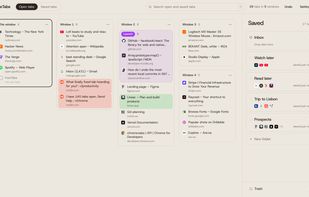
Every Chrome window side by side on one board, with folders on the right

Cost / License

  • Free
  • Open Source (MIT)

Application type

Since

  • New

Platforms

  • Google Chrome
  • Brave
0likes
0articles
Save

Features

Properties

Features

Highlights All activities

FreeTabs News & Activities

Recent activities

FreeTabs information

AlternativeTo Category

AI Tools & Services

GitHub repository

  •  0 Stars
  •  0 Forks
  •  0 Open Issues
  •   Updated  
View on GitHub
FreeTabs was added to AlternativeTo by leofree on and this page was last updated .

No comments or reviews, maybe you want to be first?

What is FreeTabs?

If you keep 50 tabs open because closing any of them feels risky, FreeTabs shows you all of them at once. Every Chrome window sits side by side on one board. Draw a lasso around the tabs you're done with and drop them into a folder. FreeTabs writes each tab to your browser's storage, reads it back, and only then closes it. Cmd+Z undoes any move, and closed tabs wait 30 days in the trash.

Search finds a tab whether it's open or saved. Drag a folder onto a window to reopen it. To hand a folder to an AI, copy it as links, Markdown or a ready-made prompt.

If you use Claude, connect FreeTabs and ask it to sort your tabs, for example "move everything from github.com into Dev". Each change it makes comes with an Undo button. A switch makes it read-only, and it never sees incognito tabs.

FreeTabs runs entirely in your browser and the code is open source (MIT). Your folders are also copied to Chrome bookmarks, so they survive an uninstall. Your OneTab list imports in one paste.