freenapse is a small native Windows program that configures the Razer devices without Razer Synapse. It is one executable of about 1 MB with no installer, no runtime, no background services and no Razer account.
Measured on the same PC and the same mouse, Synapse 4 runs as 11 Electron processes plus 2 services, uses about 1.5 GB of memory and 220 MB on disk, and polls the device continuously. freenapse is one tray process (or none, if you run the command line once) with a 10 MB working set, idle CPU and a battery read once a minute.
What it configures:
- DPI: up to 5 stages, active stage, live DPI from 100 to 35000 in 1 DPI steps, independent X and Y
- Polling rate from 125 to 8000 Hz (8000 needs the HyperPolling dongle), plus an in-game polling rate switched automatically while a game is in the foreground
- Dynamic Sensitivity: the onboard acceleration curve with the Classic, Natural and Jump presets or your own curve
- Sensor: Smart Tracking 1 to 3 mm, asymmetric cut-off (lift-off and landing levels), angle correction
- Power: idle sleep timeout, low power mode threshold, battery level and charging state, dongle LED
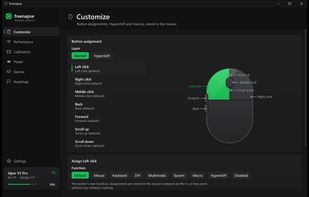
- Buttons: onboard remapping of every button on the normal and Hypershift layers (mouse functions, double-click, turbo, keyboard keys with modifiers, media keys, DPI stage and cycle, sleep / power / wake, macros)
- Macros recorded in the window or written in the config file, played once, N times, while held, toggled or as a sequence
- Per-game profiles: games installed through Steam, Epic, GOG, EA app, Battle.net, Riot, Ubisoft Connect, Rockstar and the Xbox app are found locally, and each profile gets its own DPI stage, polling rate and button layout
- Dongle pairing and unpairing, firmware versions and serial numbers
It comes in three forms inside the same file: a tray icon with battery percentage and quick DPI and polling switching, a dark settings window in the style of a game client (Customize, Performance, Calibration, Power, Games) where every change is written to the mouse the moment you make it, and a command line (freenapse status, config, apply, dpi, polling, and so on) for scripts and portable use. The config is a single TOML file that can live next to the executable on a USB stick.
Written in Rust against the plain Windows HID stack (no hidapi, no GUI framework, no Razer drivers needed). The protocol was worked out for interoperability from the mouse's own answers, the GPL OpenRazer driver and public protocol notes; the program contains no Razer code, files or assets. freenapse is an independent open-source project under the MIT license, not affiliated with, endorsed by or supported by Razer Inc. Use at your own risk: it changes what is stored in the mouse's onboard memory. Every setting can be written again, and reinstalling Synapse restores Razer's own profile.







 EU


 MatthewSaintbull added Freenapse as alternative to Razer Synapse, SteerMouse and OpenMouse

 Matteo Santoro


No comments or reviews, maybe you want to be first?