Free Screen Video Recorder Alternatives

Free Screen Video Recorder is described as 'Compact, yet full-featured screen video recorder and screenshot capture tool that allows you to easily record screen activities and capture anything on the screen including windows, objects, menus, full screen and rectangular regions' and is a screenshot capture tool in the video & movies category. There are more than 100 alternatives to Free Screen Video Recorder for a variety of platforms, including Windows, Mac, Web-based, Linux and Google Chrome apps. The best Free Screen Video Recorder alternative is OBS Studio, which is both free and Open Source. Other great apps like Free Screen Video Recorder are ShareX, Greenshot, GPU Screen Recorder and SimpleScreenRecorder.

Copy a direct link to this comment to your clipboard
Free Screen Video Recorder alternatives page was last updated

Alternatives list

  1. Copy a direct link to this comment to your clipboard

    Free Online Screen Recorder - Record your screen and webcam. No download required. Protected by end-to-end encryption. Free to use on Windows, Mac, Linux, iOS, Android.

    Cost / License

    • Freemium (Subscription)
    • Proprietary

    Platforms

    • Online
    • Software as a Service (SaaS)
     
  2. Copy a direct link to this comment to your clipboard

    Onde Screen Capture for Mac is currently the most professional and powerful screen grabbing utility running on Mac OS, by which you can easily capture any part on your Mac desktop such as rectangular or ellipse region, freehand region, full screen, active window or all windows...

    Cost / License

    • Freemium
    • Proprietary

    Application type

    Platforms

    • Mac
     
  3. Copy a direct link to this comment to your clipboard

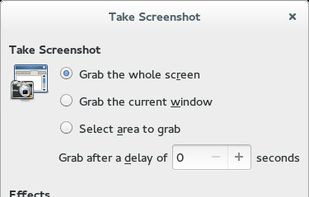
    GNOME Screenshot is a utility used in the GNOME desktop environment for taking screenshots. It was part of the GNOME Utilities (gnome-utils) package, but was split into its own package for the 3.3.1 version in 2011.

    Cost / License

    • Free
    • Open Source

    Application type

    Platforms

    • Linux
    • FreeBSD
    • GNOME
     
  4. SnipSnip icon
     2 likes
    Copy a direct link to this comment to your clipboard

    SnipSnip is a screen capture utility, designed for easy capture of some or all of your screen(s). It also allows you to do simple tasks like resizing, cropping and drawing on the capture.

    Cost / License

    • Free Personal
    • Proprietary

    Application type

    Platforms

    • Windows
     
  5. Copy a direct link to this comment to your clipboard

    FlashDemo Screen Recorder captures all screen activity from your Windows Desktop in real time and publishes as a Flash movie. Perfect for creating online tutorial, training & support videos, E-Learning material.

    Cost / License

    • Paid
    • Proprietary

    Platforms

    • Windows
     
  6. Copy a direct link to this comment to your clipboard

    The all-in-one screen capture production suite. Easily capture on-screen action to a movie from start to finish. It’s the best of both worlds: the power of MediaEdit and ScreenRecord. It includes everything you need to create your presentation.

    Cost / License

    • Paid
    • Proprietary

    Platforms

    • Mac
     
  7. Camtica icon
     Like
    Copy a direct link to this comment to your clipboard

    Camtica is Screen Recording Software. It enables you to create professional screen recordings, presentations, tutorials and more. You can record any desktop activity with voice, webcam and animated mouse clicks.

    Cost / License

    • Paid
    • Proprietary

    Application type

    Platforms

    • Windows
     
  8. Copy a direct link to this comment to your clipboard

    Snip is a screen-capture application that can capture the active window or custom areas. Drag to zoom in/out the screen shot; add labels, texts and handwriting contents of your choice and save it to your device or the clipboard.

    Cost / License

    • Free
    • Proprietary

    Application type

    Platforms

    • Mac
     
You are at page 11 of Free Screen Video Recorder alternatives