





frame-perf-overlay
Like
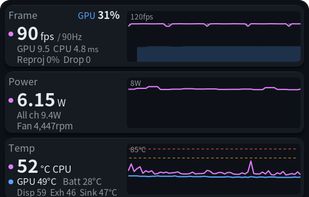
Performance overlay for Steam Frame: fps, CPU/GPU, temperatures, power, battery and Steam Link link in SteamVR (unofficial) / Steam Frame.

Cost / License
- Free
- Open Source (MIT)
Platforms
- SteamOS
- SteamVR


Features
frame-perf-overlay News & Activities
Highlights All activities
Recent activities
- Darlene Sonalder added frame-perf-overlay
- Paul updated frame-perf-overlay
 Darlene Sonalder added frame-perf-overlay as alternative to fpsVR, OVR Toolkit, XSOverlay and Desktop+ VR Overlay

frame-perf-overlay information
Developed by
 sasaken1102r
 Licensing
Open Source (MIT) and Free product.Written in
Alternatives
4 alternatives listedBadge
Get an embeddable badge for frame-perf-overlaySupported Languages


No comments or reviews, maybe you want to be first?