
Fotera icon
Fotera icon

Fotera

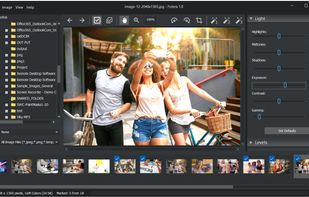
Fotera is a free Windows photo editing application built for users who want to adjust and improve their images without modifying the original photo files. The program uses a non-destructive editing workflow: correction settings are stored separately and automatically restored...
Fotera screenshot 1

Cost / License

  • Free
  • Proprietary

Platforms

  • Windows
0likes
0comments
0alternatives
0articles

Features

Properties

  1.  Lightweight

Features

  1.  Works Offline
  2.  Ad-free
  3.  Non Destructive Editing
  4.  Live Preview
  5.  No registration required
  6.  Hardware Accelerated
  7.  RAW Photo Editors
  8.  Dark Mode
  9.  No Tracking
  10.  Photo effects

Fotera News & Activities

Highlights All activities

Recent activities

Fotera information

  • Developed by

    CY flagTkoSoft
  • Licensing

    Proprietary and Free product.
  • Alternatives

    0 alternatives listed
  • Supported Languages

    • English
    • Spanish
    • German
    • Italian
    • Polish
    • Chinese
    • Korean

AlternativeTo Categories

Photos & GraphicsSystem & Hardware
Fotera was added to AlternativeTo by tkosoft on and this page was last updated .
No comments or reviews, maybe you want to be first?

What is Fotera?

Fotera is a free Windows photo editing application built for users who want to adjust and improve their images without modifying the original photo files. The program uses a non-destructive editing workflow: correction settings are stored separately and automatically restored when the same photo is selected again.

The application is especially useful for users who work with many images in folders. Fotera displays photos as thumbnails, lets the user quickly move through a collection, apply corrections, mark selected images, and export edited copies when needed.

Fotera provides a wide range of image adjustment tools, including brightness and exposure correction, contrast, highlights, shadows, midtones, gamma, color temperature, tint, saturation, RGB balance, HSL correction, color curves, levels, sepia, crop, rotation, and lens distortion correction. It also includes histogram viewing, EXIF/IPTC information, printing options, scanner acquisition, and batch export.

The software also supports RAW photo editing options, making it useful for photographers who need a free tool for basic RAW image correction and preparation before export.

