
Folio Wiki icon
Folio Wiki icon

Folio Wiki

Folio is a self-hosted team wiki built to replace Confluence and Notion. Every page is a plain Markdown file in a Git repository you control, so the content can be read without Folio, edited from an IDE and reviewed like code — while the team writes in the browser, together, in...
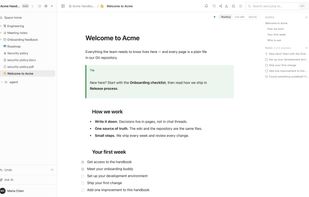
A team wiki page: outline, callout and checklists, in reading mode

Cost / License

  • Free
  • Open Source (MIT)

Application type

Platforms

  • Self-Hosted
  • Docker
  • Online
  • Software as a Service (SaaS)
1like
0articles
Save

Features

  1.  Works Offline
  2. Git icon  Git Support
  3.  Ad-free
  4.  Support for @mentions
  5.  Dark Mode
  6.  Hierarchical Structure
  7.  Support for MarkDown
  8.  Real time collaboration
  9.  Mermaid support
  10.  Team Collaboration
  11.  Knowledge Base
  12.  Model Context Protocol (MCP) Support
  13.  Wiki

Folio Wiki News & Activities

Highlights All activities

Recent activities

Folio Wiki information

AlternativeTo Categories

Office & Productivity, Development, Social & Communications, Education & Reference, Remote Work & Education, AI Tools & Services

GitHub repository

  •  14 Stars
  •  0 Forks
  •  0 Open Issues
  •   Updated  
View on GitHub

Popular alternatives

View all
Folio Wiki was added to AlternativeTo by Sergii-Kravtsov on and this page was last updated .

No comments or reviews, maybe you want to be first?

What is Folio Wiki?

Folio is a self-hosted team wiki built to replace Confluence and Notion. Every page is a plain Markdown file in a Git repository you control, so the content can be read without Folio, edited from an IDE and reviewed like code — while the team writes in the browser, together, in real time.

What is in it:

  • Documents with a live Markdown editor, callouts, page links, mentions and a visual editor for Mermaid diagrams.
  • Data tables with typed columns, saved views, filters and sorting, stored as a readable Markdown table. Forms write their answers into a table.
  • Excalidraw whiteboards stored as editable SVG files.
  • Real-time collaboration on documents, tables and whiteboards; authorship ends up in the Git commit.
  • Offline mode: write, edit and create pages without a connection; changes sync when it returns.
  • Access management: roles per space, private spaces, page-level access, an audit log, public share links.
  • PDF, Word, Excel and PowerPoint files open as pages, under the same access rights.
  • Built for AI agents: an MCP server with 21 tools, a Markdown link to any page, and a built-in assistant that can be customized per space.
  • Import from Confluence (pages, images, whiteboards); export to Markdown, PDF, DOCX and YAML.

Folio starts with one command (docker compose up -d) and is MIT-licensed. It was built by AI agents working from plans and hand-off notes that are published in the repository.

Good to know: Folio needs PostgreSQL and Redis (both are in the Compose file); there is no SSO and there are no user groups yet; the built-in assistant requires your own Cursor subscription; PDF and Office files are view-only.
