





Folia Files
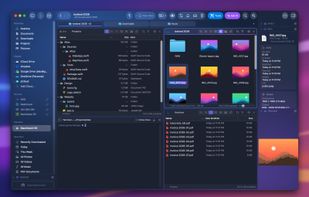
A native file manager for Mac: panes side by side in ten views, search in names, text and images, servers and 50+ clouds as disks, and a clipboard history.

 EU


Features
Folia Files News & Activities
Recent activities
- reviewed Folia Files★★★★★
Folia is the most utility driven file management apps for macOS you can find. I am a long time ForkLift user, it's a great app, is a workhorse and gets the job done. Folia takes that and extends it 50 fold at every metric.
On the surface Folia is a really sleek folder and file management app. The interface is highly customizable and easy to use. It works with SMB shares, SFTP, cloud services, and other remote endpoints. The set up and management of endpoints is really easy. It supports the...
- kawikak liked Folia Files
I've tried many Finder alternatives over the years, but Folia files is one that's getting some serious time from me.
It gets a lot of things right, from managing column widths to am ambitious integration of tools and configurable window panes. I'm like the ability to compose workspaces around different activities.
I'm still learning some of the interface metaphors, but what I've seen so far is very promising. The developers are also responsive to feedback and suggestions.
It's definitely...
- Wonderlinkes updated Folia Files
- RemovedUser A comment was removed from Folia Files
One word: impressive! I’ve tested and bought many Finder alternatives, and Folia Files does everything they do, with no lag and an interface you can fully customize to your needs. On top of that, it offers exclusive features, like the Map view linked to Apple Maps, which shows the photos in a folder based on where they were taken, or search inside the content of images: not just text, but also context. I hadn’t seen that outside of specialized apps like Excire Foto. Try it, you won’t regret it!
- Tatos987 liked Folia Files
I started with Path Finder. Ten months into having my Mac I saw a post in Reddit about this app. I then installed the trial. After a very short time I had paid for the app. The bit I like about the app is how you have so many chooses on the layout and the look of it. It is packed full of tools (that ARE useful and not just fluff). Using it day to day does help me stay productive. The apps developer listens to his users and is open to feedback. Off all the apps I have purchased this has bee on...
- RemovedUser added Lightweight as a feature to Folia Files
Developed by
 wonderlink SL
Licensing
Proprietary and Commercial product.Pricing
One time purchase (perpetual license) ranging between $50 and $70.Alternatives
11 alternatives listedBadge
Get an embeddable badge for Folia FilesSupported Languages


Comments and Reviews
I have been a Forklift user for years and it gets the job done. I came across Folia Files by accident and while I had no plans to be buying another file management app, after testing it out for a few hours, I was hooked. So I bought it. What do I like about it? For me, it changes the way that I interact with files on my Mac, in a positive way that I could never really achieve with Forklift (and certainly with Finder). It’s a highly functional app and I’m just scratching the surface of the many features it seems to offer. App aesthetics have never been something that important to me, but this is also a beautiful looking (and very customisable) app in that regard. I can only suggest you go and try it out for yourself - I would be surprised if it didn’t improve your Mac workflows.
Folia is the most utility driven file management apps for macOS you can find. I am a long time ForkLift user, it's a great app, is a workhorse and gets the job done. Folia takes that and extends it 50 fold at every metric.
On the surface Folia is a really sleek folder and file management app. The interface is highly customizable and easy to use. It works with SMB shares, SFTP, cloud services, and other remote endpoints. The set up and management of endpoints is really easy. It supports the typical list, icon, and column view and goes even further with gallery view, mosaic view, branch view (really cool diagram view of folders), board view (think Trello), and disk usage view (!). That alone should amaze most but Folia doesn't stop there.
There are preset layouts but everything is completely customizable and modular. You can add a map view for photos, a timeline view, duplicates, clipboard history and way more. It's quite ridiculous actually. There is thoughtfully integrated AI that isn't heavy handed, a dockable file shelf, integrated terminal. This is a kitchen-sink app that doesn't feel like a kitchen sink at all. It feels sleek, smooth, and very productive.
I use Folia to manage photo libraries on a local NAS device via SMB, work files via SFTP, to keep my local downloads folder crisp and clean, my documents scans in Dropbox organized, and just to open and stare at it because I really do appreciate a well crafted mac app.
As a user ForkLift, Bloom, Qspace, Pathfinder and more I can say this is at the top of the heap. I HIGHLY recommend this app.
I've tried many Finder alternatives over the years, but Folia files is one that's getting some serious time from me.
It gets a lot of things right, from managing column widths to am ambitious integration of tools and configurable window panes. I'm like the ability to compose workspaces around different activities.
I'm still learning some of the interface metaphors, but what I've seen so far is very promising. The developers are also responsive to feedback and suggestions.
It's definitely growing on me.
One word: impressive! I’ve tested and bought many Finder alternatives, and Folia Files does everything they do, with no lag and an interface you can fully customize to your needs. On top of that, it offers exclusive features, like the Map view linked to Apple Maps, which shows the photos in a folder based on where they were taken, or search inside the content of images: not just text, but also context. I hadn’t seen that outside of specialized apps like Excire Foto. Try it, you won’t regret it!
I started with Path Finder. Ten months into having my Mac I saw a post in Reddit about this app. I then installed the trial. After a very short time I had paid for the app. The bit I like about the app is how you have so many chooses on the layout and the look of it. It is packed full of tools (that ARE useful and not just fluff). Using it day to day does help me stay productive. The apps developer listens to his users and is open to feedback. Off all the apps I have purchased this has bee on the top of the list for me.
As a teacher and university lecturer working with Arabic and German materials, what appeals to me about Folia Files is its combination of file organisation and content-focused tools. Managing course materials, worksheets, scanned texts and research references involves more than simply browsing folders, so having document search and PDF tools alongside file management is particularly relevant to my work.
What has impressed me most so far is the developer’s responsiveness. I shared feedback about Arabic search, OCR for scanned Arabic documents and notes attached to individual files, and the developer followed up with an update addressing these priorities. The attention to Arabic word prefixes and the definite article was an especially thoughtful detail.
I have not yet explored the latest version thoroughly enough to judge the accuracy of Arabic search and OCR with my own documents. However, seeing feedback from an educator taken seriously and turned into concrete improvements has left a very positive impression. It makes Folia Files a promising option for my teaching and academic workflow.
I started out with TotalFinder back in the day, then tried several alternatives, including ForkLift and Path Finder, but neither was for me. Eventually, I found QSpace Pro. I loved it for a while, but it gradually felt bloated and slow to browse. Bloom was a breeze by comparison; very fast and nicely balanced feature-wise, though some frustrating bugs have persisted through multiple updates.
Folia Files is the first app I’ve tried that brings together the speed I loved in Bloom with the depth of features and customization I appreciated in QSpace Pro. It costs more, but it also includes plenty of tools that could replace several smaller utilities.
The developer deserves a mention, too: communication has been excellent, and they’re open to feedback and quick to respond to suggestions and bug reports. Highly recommended—I genuinely think Folia Files has the potential to become the best Finder alternative out there.