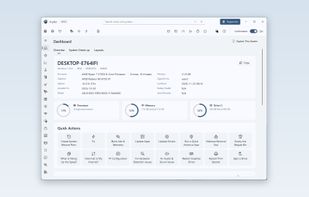
Fixyfier is a free Windows maintenance and repair toolkit that gathers the utilities Windows already ships with — DISM, SFC, CHKDSK, the built-in troubleshooters, the network commands, winget, Windows Update and dozens of buried settings — into one clear interface, so they can be used without memorising commands or digging through Settings. Close to 300 tasks, switches and answers sit across sixteen screens, and a single Fix task runs the temporary-file clear-out, a DNS flush, Disk Cleanup, DISM, SFC and a disk check in one pass, with a tick box for each of the seven steps. Its dashboard reports what the machine is, how hard it is working and whether anything is actually wrong, and PC Detective finds out what really happened: what got worse and why, whether a change helped, and what a PC looked like on the day it last worked. Elsewhere Fixyfier installs, updates and uninstalls apps in bulk, updates drivers from Windows Update, puts a switch on each of 31 preinstalled apps, turns more than 50 advertising and diagnostic-data settings off one by one or all at once, sets the PC up for a game session and puts it back afterwards, and saves any sequence of tasks as a routine you can run again with one click. It is a convenience layer, not a magic fix: every advanced task shows the exact command before it runs and asks Windows for a restore point first. No ads, no account, no telemetry, no analytics, an Offline Mode that stops everything going online, support for screen readers, and 44 languages — with one optional one-time unlock for running your own scripts.






 EU


 iZi Media Group


No comments or reviews, maybe you want to be first?