Filtru icon
Filtru icon

Filtru

 Like

Coffee brew guide app with step-by-step timers for pour-over, AeroPress, French press and espresso, plus a coffee journal and Bluetooth scale support.

Filtru screenshot 1
Filtru screenshot 2
+2
Filtru screenshot 3

Cost / License

  • Freemium (Subscription)
  • Proprietary

Application type

Since

  • New

Platforms

  • iPhone
  • iPad
0likes
0articles
Save

Features

Highlights All activities

Filtru News & Activities

Recent activities

Filtru information

  • Developed by

    GB flagSpirograph Limited
  • Licensing

    Proprietary and Freemium product.
  • Pricing

    Subscription that costs $5 per month + free version with limited functionality.
  • Alternatives

    19 alternatives listed
  • Badge

    Get an embeddable badge for Filtru
  • Supported Languages

    • English
    • German
    • French
    • Spanish
    • Italian
    • Japanese
    • Korean
    • Polish
    • Portuguese
    • Dutch
    • Swedish

AlternativeTo Category

Home & Family
Filtru was added to AlternativeTo by Mauricio B. Holguin on and this page was last updated .

No comments or reviews, maybe you want to be first?

Official Links

What is Filtru?

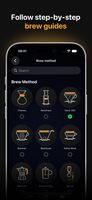
Filtru is a coffee brewing app for iPhone and iPad that walks you through each brew with guided, step-by-step timers. It tells you how much coffee to use, when and how much water to pour and when to stir, with recipes for V60, AeroPress, Chemex, French press, Moka pot, espresso and other methods, including community brew guides and recipes from barista champions.

Beyond the timers, Filtru keeps a coffee journal for beans, recipes, ratios and tasting notes, and can fill in bag details by scanning the coffee bag with the camera. Espresso users get shot recording (dose, yield, time and taste) and a dial-in guide, and an extraction calculator works with a TDS refractometer.

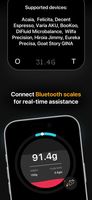
Filtru connects to supported Bluetooth coffee scales such as Acaia to show live weight, flow-rate feedback and brew graphs. It also offers AR gear guides, Live Activities, widgets and Siri Shortcuts, along with accessibility options like VoiceOver support and spoken scale readouts.