Files Backup icon
Files Backup icon

Files Backup

A lightweight Windows desktop application for automated file and folder backups to local storage, external USB drives, or NAS with encrypted ZIP archives.
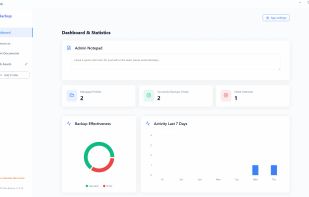
General overview of your file backup operations and success rates.

Cost / License

  • Freemium (Pay once)
  • Proprietary

Application type

Platforms

  • Windows  Available for Windows x64 (10, 11, Server 2016+). No additional libraries required.
0likes
0articles
Save

Features

Properties

Features

Highlights All activities

Files Backup News & Activities

Recent activities

Files Backup information

  • Developed by

    PL flagProject Backup
  • Licensing

    Proprietary and Freemium product.
  • Pricing

    One time purchase (perpetual license) ranging between $29 and $79 + free version with limited functionality.
  • Alternatives

    4 alternatives listed
  • Badge

    Get an embeddable badge for Files Backup
  • Supported Languages

    • English
    • Polish
Files Backup was added to AlternativeTo by Jakub Polrolniczak on and this page was last updated .

No comments or reviews, maybe you want to be first?

Official Links

What is Files Backup?

Project Backup - Files Backup is an on-premise Windows utility engineered for automated file and folder backups to local drives, external storage (USB, portable drives), or network-attached storage (NAS/SMB).

The application runs locally on the host machine and creates compressed, encrypted ZIP archives of designated files and directories without relying on external cloud storage or background telemetry.

Key Features:

  • 100% On-Premise & Zero-Cloud: Keeps all files within the local infrastructure. Sensitive business data is never routed through third-party servers.
  • Locked File Handling: Prevents job termination by safely skipping files locked by other processes (such as Outlook .pst archives or database files) and retrying on the next scheduled run.
  • Differential Backups: Optimizes disk space and execution time by backing up only modified or newly created files after the initial full backup.
  • One-Click Restore: Built-in automated unzipping and file restoration directly from the dashboard.
  • Retention & Pruning: Automated deletion of older archive files based on user-defined retention policies.
  • Automated Scheduling & Alerts: Configurable background scheduling with SMTP email notifications on backup completion or warnings.
  • Lightweight: Native Windows application (Windows 10, 11, and Windows Server 2016+) with minimal memory footprint and zero ads.

