

File Renamer (Steady State Studio) icon

File Renamer (Steady State Studio)

 Like

Rename files in batches with ordered rules, a full filename preview and persistent last-batch Undo. Free and offline for Windows and Linux.
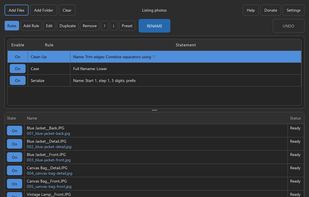
Actual File Renamer source-build interface in dark appearance, with three ordered rules and six synthetic listing filenames. Each proposed name is shown below its original; no personal files are pictured.

Cost / License

  • Free
  • Open Source (MIT)

Application type

Since

  • New

Updated

  • Updated Nov 2026

Platforms

  • Windows  x64 Windows. Extract the portable ZIP; Python is bundled. Packages are unsigned.
  • Linux  x86_64 graphical desktop with compatible system libraries and filesystem. AppImage and portable tar.gz packages are available.
0likes
0articles
Save

Features

Features

Highlights All activities

File Renamer (Steady State Studio) News & Activities

Recent activities

File Renamer (Steady State Studio) information

AlternativeTo Category

File Management

GitHub repository

  •  0 Stars
  •  0 Forks
  •  0 Open Issues
  •   Updated  
View on GitHub

Popular alternatives

View all
File Renamer (Steady State Studio) was added to AlternativeTo by Steady-State-Studio on and this page was last updated .

No comments or reviews, maybe you want to be first?

What is File Renamer (Steady State Studio)?

File Renamer is a free, open-source desktop utility for renaming batches of photos, downloads and documents. It runs locally on Windows and Linux x64, with no account, uploads, subscription or telemetry.

Add files or a folder, or drag them into the window. Build an ordered list of naming rules, then review each original filename alongside its proposed replacement before pressing Rename. Rules cover inserting or replacing text, case changes, numbering, dates, regular expressions and metadata. You can exclude individual files and save, import or export reusable presets.

For example, turn photo_01.jpg into listing_photo_01.jpg across a folder, or combine cleanup, lower case and numbering into one previewed batch. File contents stay intact and files remain in their existing folders.

The app keeps a recovery journal and offers Undo for the most recent batch, including after a restart. Interrupted operations can require recovery; external file changes can prevent restoration. Starting another batch replaces the Undo history, so keep backups and try important rules on a small sample first.

Portable Windows ZIP, Linux AppImage and Linux tar.gz packages are available. Linux needs a compatible graphical desktop and system libraries. Packages are unsigned, and published checksums let you compare the downloaded file with the release. No macOS build is provided. Every feature is free; donations are optional. Application code is MIT licensed, with separate notices for bundled dependencies.