Feex is an local AI assistant for Windows that gives your computer the ability to understand itself.
Unlike generic chatbots, PC cleaners, or traditional monitoring tools, Feex connects AI with the real context of your device: its hardware, software, running processes, temperatures, resource usage, startup behavior, storage, network health, and performance history. This allows Feex to answer questions about your actual computer, diagnose problems, explain what is happening, and guide you toward the right solution.
You can ask Feex questions in plain language, such as:
• Why is my computer slow?
• What is using all my RAM?
• Why is this game stuttering?
• Is my CPU or GPU temperature normal?
• Which programs are slowing down startup?
• Is my SSD healthy?
• Do I have enough memory for this application?
• Why is my internet connection unstable?
• What hardware is installed in my PC?
• What can I safely disable, remove, or fix?
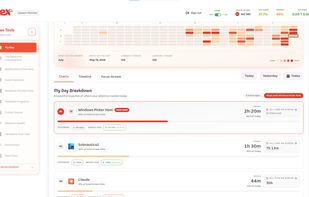
Feex combines a context-aware AI assistant, Windows diagnostic tool, system information utility, hardware monitor, and troubleshooting platform in one simple experience. Instead of searching through Task Manager, Windows settings, Reddit, support forums, and YouTube tutorials, users can ask their computer directly.
Feex does more than display technical data. It translates complex system behavior into clear explanations: what is happening, why it is happening, whether it is normal, and what should be done next. It can help identify high CPU, GPU, RAM, disk, or network usage; overheating; slow boot times; background applications; storage problems; hardware bottlenecks; unstable performance; game frame drops; and common Windows issues.
When action is needed, Feex can recommend safe, understandable, and reversible steps. The goal is not to apply random “PC optimization” tricks, but to understand the real cause of each problem before suggesting a solution.
Feex is designed for everyday Windows users, PC gamers, creators, students, professionals, enthusiasts, and anyone who wants expert-level insight without needing to become a computer expert.
Built with a local-first, privacy-conscious approach, Feex focuses on device health and system behavior rather than personal content. It is not designed to read private documents, record keystrokes, or constantly capture the screen.
Feex is building the intelligence layer for personal computing: an AI that understands your PC, helps you troubleshoot it, explains its behavior, and makes Windows easier to use.








 Feex
Feex 
No comments or reviews, maybe you want to be first?