FastConvert icon
FastConvert icon

FastConvert

 Like

FastConvert is a web-based batch converter for images, video and audio, built for people who repeat the same file preparation every week, such as freelancers and small web or content teams. Its main idea is the recipe: choose the output format and settings once, save them, and...
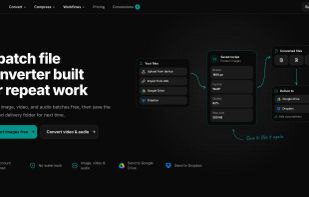
Homepage: batch conversion with a saved recipe and delivery to Google Drive or Dropbox

Cost / License

  • Freemium (Subscription)
  • Proprietary

Application type

Since

  • New

Platforms

  • Online
  • Software as a Service (SaaS)
0likes
0articles
Save

Features

Properties

Features

Highlights All activities

FastConvert News & Activities

Recent activities

FastConvert information

  • Developed by

    FastConvert
  • Licensing

    Proprietary and Freemium product.
  • Pricing

    Subscription ranging between $9 and $19 per month + free version with limited functionality.
  • Alternatives

    15 alternatives listed
  • Badge

    Get an embeddable badge for FastConvert
  • Supported Languages

    • English
FastConvert was added to AlternativeTo by neon799 on and this page was last updated .

No comments or reviews, maybe you want to be first?

What is FastConvert?

FastConvert is a web-based batch converter for images, video and audio, built for people who repeat the same file preparation every week, such as freelancers and small web or content teams. Its main idea is the recipe: choose the output format and settings once, save them, and reuse them on every new batch so the results stay consistent.

What sets it apart from most online converters:

  • Reusable recipes for images and for video/audio (1 with a free account, 5 on Basic, unlimited on Pro).
  • Delivery of finished files straight to a Google Drive or Dropbox folder on paid plans. Files can also be imported from Google Drive, Dropbox, public URLs or your device.
  • Client upload portals (Pro): clients send files through a branded link, your recipe is applied, and the results are delivered to your cloud folder.
  • Balanced presets by default, with full control when you need it: codec (H.264, H.265, AV1, VP9, ProRes and more), quality, encoder effort, resolution up to 4K and frame rate.
  • Free to use without an account or watermark, and no ads.

Images: JPEG, PNG, WebP, AVIF, HEIC, JPEG XL, JPEG 2000, TIFF, GIF and SVG input. Resize and crop, set quality, keep or strip metadata, rotate, trim borders, or target a maximum file size such as 200 KB. Video: MP4, WebM, MOV, MKV, AVI and more. Trim, crop, change aspect ratio, resolution, frame rate or rotation, compress, and extract the audio. Audio: MP3, WAV, FLAC, AAC, OGG, Opus, M4A, WMA and AIFF. Trim, normalize volume, and choose codec, bitrate, sample rate and channels. Archives: create ZIP (with optional AES-256 password), 7Z, TAR and TAR.GZ, and extract ZIP, RAR, 7Z, TAR and TAR.GZ.

Limits and privacy: the free plan allows up to 10 images or 2 media files per batch and 20 conversions per 24 hours. Basic raises batches to 20 images or 4 media files, and Pro to 50 images or 12 media files, with media files up to 1 GB. Uploaded files are deleted automatically (after 24 hours on the free plan, 7 days on paid plans). The site shows no advertising and uses only anonymous, aggregated audience statistics.

FastConvert Videos