
FaceGate icon
FaceGate icon

FaceGate

World's first face authentication enabled macOS app-locker. Unlock your Mac apps using face, TouchID or password. Completely local and encrypted - your data never leaves your Mac.
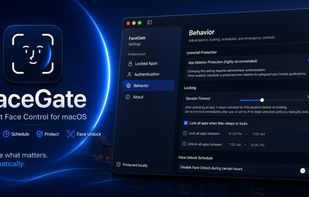
FaceGate screenshot 1

Cost / License

  • Free
  • Open Source (MIT)

Platforms

  • Mac
  • Homebrew
0likes
0comments
0articles

Features

Properties

  1.  Privacy focused

Features

  1.  Ad-free
  2.  No registration required
  3.  No Tracking
  4.  Works Offline
  5.  Dark Mode
  6.  Facial Recognition
  7.  Unlock with fingerprint
  8.  Sits in the MenuBar
  9.  Password protection
  10.  Support for Hotkeys
  11.  Global hotkey
  12.  Touch ID for Mac

FaceGate News & Activities

Highlights All activities

Recent activities

FaceGate information

  • Developed by

    IN flagDweep Desai
  • Licensing

    Open Source (MIT) and Free product.
  • Written in

  • Alternatives

    8 alternatives listed
  • Supported Languages

    • English

GitHub repository

  •  37 Stars
  •  2 Forks
  •  3 Open Issues
  •   Updated  
View on GitHub
FaceGate was added to AlternativeTo by Paul on and this page was last updated .
No comments or reviews, maybe you want to be first?

What is FaceGate?

FaceGate is a native macOS utility that brings app-level locking with FaceUnlock to your Mac. Lock sensitive applications behind FaceUnlock, Touch ID, or a secure password — all processed entirely on-device with zero telemetry.

macOS natively lacks the ability to restrict individual applications. Although other App-lockers exist, none of them use face recognition and are not as feature rich as FaceGate.

All controls in your hands - 100% free & open source, 100% malware free, 100% local .

Features:

  • App Locking — Lock any installed app. FaceGate intercepts launches in real-time and prevents access until authenticated.
  • On-Device Face Recognition — Software-based face embedding pipeline running entirely on your Mac via the Apple Neural Engine. No cloud, no data leaving your device.
  • Liveness Detection — Head-pose challenges (turn left, turn right, tilt) to prevent photo and video spoofing.
  • Touch ID — Seamless integration with macOS Touch ID.
  • Password — Encrypted PIN stored in the macOS Keychain.
  • Per-App Session Timers — Customizable unlock duration per app, including "Keep Unlocked Indefinitely." and "Lock immediately"
  • Lock-on-Sleep — Automatically lock all apps when your Mac sleeps or the screen locks.
  • Uninstall Protection — Prevents casual deletion by making the app bundle immutable and requires Admin Privileges to uninstall.
  • Scheduled App-Lock/Unlock — Time-based auto-lock and auto-unlock windows.
  • FaceUnlock Schedule — Disable face recognition during specific hours (e.g., when dark or in public spaces) to automatically fallback to Touch ID/Password.
  • Auto-Optimization — Automatically boost display brightness and trigger Center Stage to improve camera visibility and face detection accuracy.
  • Customizable Sensitivity — Fine-tune face recognition similarity thresholds to balance convenience and security.
  • Menu Bar Control — Monitor locked/unlocked apps and lock them directly from the menu bar popup.
  • Secure Operations — Require authentication to quit the application or configure settings to prevent unauthorized tampering.
  • Emergency Kill Hotkey — Global keyboard shortcut to instantly terminate.
  • Menu Bar Agent — Runs silently in the menu bar — no Dock icon, no distractions.

FaceGate Videos

Official Links
