f.lux Alternatives

f.lux is described as 'Software that makes the color of your computer's display adapt to the time of day, warm at night and like sunlight during the day' and is a leading color temperature tool in the system & hardware category. There are more than 50 alternatives to f.lux for a variety of platforms, including Windows, Linux, Mac, Android and Wayland apps. The best f.lux alternative is Redshift, which is both free and Open Source. Other great apps like f.lux are LightBulb, SunsetScreen, RedshiftGUI and Twilight.

filter to find the best alternatives

f.lux alternatives are mainly Color Temperature Tools, but if you're looking for Screen Dimmers or Health Tools you can filter on that. Other popular filters include Linux, Android, Mac, Windows and Screen Dimmer. You can also filter by region, for example EU-based alternatives if you prefer software developed in the European Union. These are just examples - use the filter bar below to find more specific alternatives to f.lux.
Copy a direct link to this comment to your clipboard
f.lux alternatives page was last updated

Alternatives list

  1. Copy a direct link to this comment to your clipboard

    Do you use your mobile phone after sunset? Do you use your phone within three hours of your bed time? If yes, then your device might be taking your sleep away. Bluelight from your mobile screens sends a signal to brain to wake up, and makes it difficult for us to sleep at night.

    46 Night Shift: Blue Light Filter alternatives

    Cost / License

    • Free
    • Proprietary

    Application type

    Platforms

    • Android
    • Android Tablet
     
    • Night Shift: Blue Light Filter is the most popular Android Tablet alternative to f.lux.

    • Night Shift: Blue Light Filter is Free and Proprietaryf.lux is also Free and Proprietary
  2. Lumen icon
     2 likes
    Copy a direct link to this comment to your clipboard

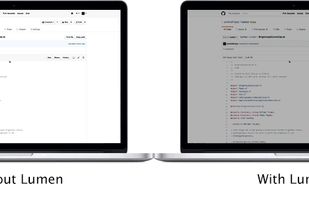
    Lumen - magic auto brightness based on screen contents. You control Lumen simply by using your brightness keys - it'll automatically learn your preferences.

    Cost / License

    • Free
    • Open Source

    Application type

    Alerts

    • Discontinued

    Platforms

    • Mac
     
  3.  2 likes
    Copy a direct link to this comment to your clipboard

    Inspired by Redshift, Blueshift adjusts the colour temperature of your monitor according to brightness outside to reduce eye strain and make it easier to fall asleep when going to bed.

    Cost / License

    • Free
    • Open Source

    Application type

    Alerts

    • Discontinued

    Platforms

    • Linux
     
  4. EasyEyes icon
     6 likes
    Copy a direct link to this comment to your clipboard

    Trouble Sleeping? Device screen too bright even on the lowest brightness setting? Want to give your phone a warm look instead of that eye straining blue gaze you see at night? EasyEyes is the solution. By changing your device's color temperature, EasyEyes reduces eye strain...
    Cost / License

    • Freemium (Pay once)
    • Proprietary

    Platforms

    • Android
     
  5. Copy a direct link to this comment to your clipboard

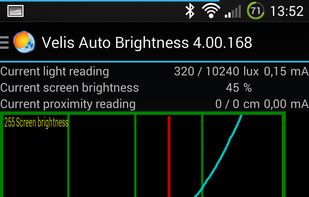
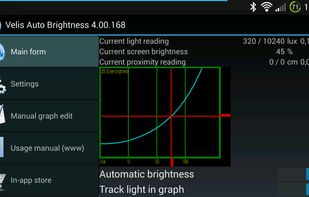
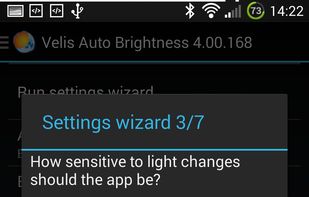
    Velis Auto Brightness is a pretty powerfully adjustable auto-brightness app for your android device.

    Cost / License

    • Freemium (Pay once)
    • Proprietary

    Platforms

    • Android
    • Android Tablet
     
  6. Copy a direct link to this comment to your clipboard

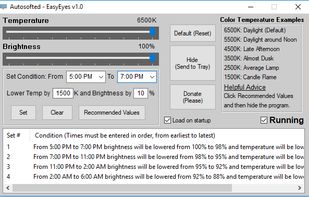
    EasyEyes by Autosofted is an app that can do what f.lux does and more. F.lux only allows the user to adjust temperature, while EasyEyes allows both temperature AND brightness adjustment. EasyEyes allows the user to create multiple transition times.

    Cost / License

    • Free
    • Open Source

    Application type

    Platforms

    • Windows
     
  7. Calise icon
     3 likes
    Copy a direct link to this comment to your clipboard

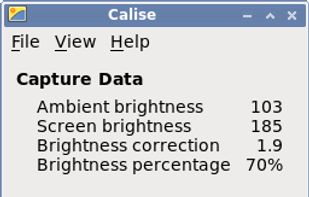
    A Python program that calculates ambient brightness and sets screen's correct backlight using a camera.
    Cost / License

    • Free
    • Open Source

    Application type

    Platforms

    • Linux
     
  8. NightTone icon
     2 likes
    Copy a direct link to this comment to your clipboard

    NightTone makes your screen more comfortable, enjoyable and healthier by shifting the colors of your display to a warmer, eye-friendly palette. It makes you sleep and feel better.

    Cost / License

    • Pay once
    • Proprietary

    Platforms

    • Mac
     
  9. Shifty icon
     4 likes
    Copy a direct link to this comment to your clipboard

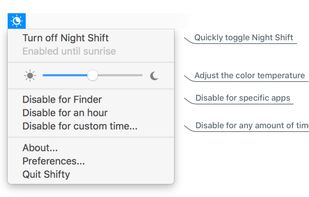
    Shifty was made to expand the capabilities of the built in Night Shift feature in macOS. You can disable Night Shift for specific apps and custom time periods. It also provides easy access to a slider to fine tune your color temperature.
    Cost / License

    • Free
    • Open Source

    Application type

    Platforms

    • Mac
     
  10. Copy a direct link to this comment to your clipboard

    Setting the color temp of the screen really only requires about 40 lines of C (80 or so all inclusive). sct is a crude utility which does roughly that. I’d say exactly that, but some of the calculations aren’t actually exact.

    50 SCT - Set Color Temperature alternatives

    Cost / License

    • Free
    • Open Source

    Application type

    Platforms

    • Linux
     
You are at page 3 of f.lux alternatives