

Experimenters Circuits icon

Experimenters Circuits

 4 likes

A circuit simulator for learning electricity and electronics. Pick components and instruments, place them in the workspace and connect their terminals with cables. The simulation runs while you build, so the meters and lamps respond to every new connection and every turn of a...
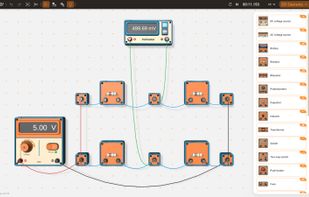
Resistor bridge measured with a voltmeter

Cost / License

  • Free
  • Proprietary

Application type

Since

  • Since 2024 (updated Nov 2026)

Platforms

  • Mac
  • Online
  • iPhone
  • iPad
4likes
0articles
Save

Features

Properties

Features

Highlights All activities

Experimenters Circuits News & Activities

Recent activities

Experimenters Circuits information

AlternativeTo Categories

Education & Reference, Online Services, Remote Work & Education

Apple AppStore

  •   Updated 
  •   0 avg rating
Experimenters Circuits was added to AlternativeTo by polina3101grigoreva on and this page was last updated .

No comments or reviews, maybe you want to be first?

Official Links

What is Experimenters Circuits?

A circuit simulator for learning electricity and electronics. Pick components and instruments, place them in the workspace and connect their terminals with cables. The simulation runs while you build, so the meters and lamps respond to every new connection and every turn of a knob.

Who it is for Students studying electricity in school or at university, teachers demonstrating a circuit to a class, and anyone who wants to understand how a circuit works before building a real one.

What you can do

  • Open a ready-made lab: Ohm's law, series and parallel circuits, capacitor charging, resonance, a rectifier, a transistor switch, and change it as you like.
  • Build circuits from power sources, resistors, capacitors, inductors, transformers, diodes, transistors, lamps, LEDs, switches and fuses.
  • Measure with an ammeter, voltmeter, wattmeter and oscilloscope.
  • Operate each instrument with its own controls: turn knobs, flip switches and press buttons.
  • Slow time down and watch what normally takes a fraction of a second.
  • Undo and redo your steps, copy part of a circuit and align everything to a grid.

When something goes wrong The lab does not stop you from making a mistake. Short a power supply, and it switches itself off. Give a lamp too much voltage, and its filament flashes and burns out. An overloaded fuse blows. A source has internal resistance, a cable has a resistance of its own, and a meter slightly changes the circuit it measures.

Good to know

  • No account is needed to build, measure and save.
  • Runs in desktop and mobile browsers and as an app for iPhone, iPad and Mac.

Experimenters Circuits Videos