
eqMini icon
eqMini icon

eqMini

A small macOS equalizer for all audio or selected apps. SwiftUI, Core Audio taps, and local processing.
eqMini screenshot 1

Cost / License

  • Free
  • Open Source (MIT)

Application type

Platforms

  • Mac
1like
0articles
Save

Features

Properties

Features

Highlights All activities

eqMini News & Activities

Recent activities

eqMini information

AlternativeTo Category

Audio & Music

GitHub repository

  •  1 Stars
  •  0 Forks
  •  0 Open Issues
  •   Updated  
View on GitHub
eqMini was added to AlternativeTo by elmsec on and this page was last updated .

No comments or reviews, maybe you want to be first?

Official Links

What is eqMini?

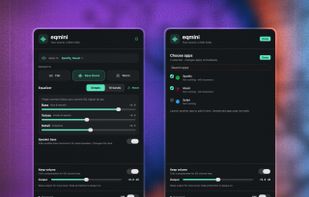
A small equalizer for macOS. Shape all audio or just the apps you choose.

Ten-band EQ, simple tone controls, and a bass enhancer for small speakers. No virtual audio driver, account, analytics, or audio uploads. MIT licensed.

Usage

Choose Flat, Bass Boost, Warm, or your saved Custom curve. Adjust Bass, Voices, and Detail in Simple, or switch to 10 bands. Switching views preserves the sound. Speaker bass adds audible bass harmonics for small speakers. Keep volume compensates for EQ headroom; Output adds gain. Large boosts can cause compression. Choose All audio or Selected apps. Selected apps share one curve; other apps keep their normal sound. Reset clears the EQ, Custom curve, and Speaker bass. Double-click a band to reset it individually. The first normal launch opens a welcome window; later startups stay in the menu bar. Use More → Open Equalizer Window for a regular window. Left-click the menu-bar icon for the panel; right-click for quick actions. Closing the window leaves eqMini in the menu bar; quitting stops processing. Settings… contains optional Launch at login and Restore EQ on launch, both off by default.

Shortcuts: ⌘O open window · ⌘1 / ⌘2 Simple / 10 bands · ⌘E enable / disable · ⌘, Settings · ⌘Q quit.