
Eofent Capture icon
Eofent Capture icon

Eofent Capture

Chrome/Edge extension to capture full pages, areas or the screen as image, PDF or MHTML, record video/audio, annotate, and batch-capture URLs.
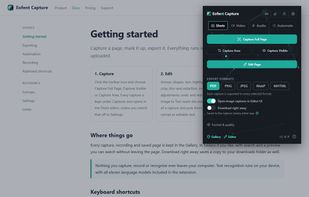
Eofent Capture screenshot 1

Cost / License

  • Freemium (Subscription)
  • Proprietary

Platforms

  • Google Chrome
  • Microsoft Edge
0likes
0articles
Save

Features

Properties

  1.  Privacy focused
  2.  Lightweight

Features

  1.  Dark Mode
  2.  Built-in Color Picker
  3.  OCR
  4.  Works Offline
  5.  Non Destructive Editing
  6.  Full-page Screenshot
  7.  No registration required
  8.  No Tracking
  9.  Ad-free
  10.  Image Annotations
  11.  Screen Recording
  12.  Convert Videos to Animated GIFs
  13.  System audio recording
  14.  Color Picker
  15.  Audio Recording
  16.  GIF recording
  17.  Batch processing

Eofent Capture News & Activities

Highlights All activities

Recent activities

Eofent Capture information

  • Developed by

    US flagEofent
  • Licensing

    Proprietary and Freemium product.
  • Pricing

    Subscription that costs $3 per month + free version with limited functionality.
  • Alternatives

    7 alternatives listed
  • Badge

    Get an embeddable badge for Eofent Capture
  • Supported Languages

    • English
    • German
    • Italian
    • French
    • Japanese
    • Turkish
    • Russian
    • Spanish
    • Chinese
    • Korean
    • Portuguese
Eofent Capture was added to AlternativeTo by Eofent-LLC on and this page was last updated .

No comments or reviews, maybe you want to be first?

What is Eofent Capture?

Eofent Capture is a browser extension for Chrome and Edge that captures web pages and the screen, then lets you edit and export the result without leaving the browser.

Capture

Full-page capture with automatic scrolling and stitching, plus visible-area and custom-region modes Handles sticky headers and pop-ups; elements can be hidden or removed before capturing Export as PNG, JPEG, WebP, PDF or MHTML (saved page) PDF export with a selectable, searchable text layer and offline text recognition (OCR)

Record

Record a tab, a window or the whole screen, with audio Export as video or GIF; built-in video and audio editors with a timeline

Edit

Image editor with arrows, text, shapes, blur, redaction, crop and lasso Project-based editing, so annotations can be reopened and changed later

Automate

Capture a whole list of URLs in one run Scheduled recurring captures and link crawling

Organize

Built-in library with folders, grouped by date or website
