EnforceDoze icon
EnforceDoze icon

EnforceDoze

EnforceDoze allows you to forcefully enable Doze right after you turn off your

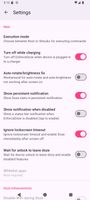
EnforceDoze screenshot 1

Cost / License

Application type

Platforms

  • Android
  • F-Droid  IzzyOnDroid repo
3likes
0comments
0articles

Features

Properties

  1.  Lightweight

Features

  1.  Root required
  2.  Ad-free
  3.  Battery Saving

EnforceDoze News & Activities

Highlights All activities

Recent activities

EnforceDoze information

  • Developed by

    FR flagAkylas
  • Licensing

    Open Source (GPL-3.0) and Free product.
  • Written in

  • Alternatives

    7 alternatives listed
  • Supported Languages

    • English
    • German
    • Spanish
    • French
    • Italian
    • Japanese
    • Portuguese
    • Russian
    • Ukrainian
    • Chinese

AlternativeTo Category

System & Hardware

GitHub repository

  •  307 Stars
  •  10 Forks
  •  22 Open Issues
  •   Updated  
View on GitHub
EnforceDoze was added to AlternativeTo by Darlene Sonalder on and this page was last updated .
No comments or reviews, maybe you want to be first?

What is EnforceDoze?

EnforceDoze allows you to forcefully enable Doze right after you turn off your screen, and on top of that, it also disables motion sensors so Doze stays active even if your device is not stationary while screen off. Doze will only deactivate periodically to execute maintenance jobs (like getting notifications, etc), otherwise it will remain active as long as your screen is off. This brings a lot more battery savings than standard Doze functionality, because even with screen off and Doze enabled, Doze is still periodically checking for movement, and disabling motion sensing improves battery life further.

Features

  • Force Doze mode immediately after screen off or after a user specified delay
  • Add/remove apps or packages directly to system Doze whitelist
  • Disable motion sensors to prevent Doze from kicking in during movement
  • Tasker support to turn on/off EnforceDoze and modify other features
  • Disable WiFi and mobile data completely during Doze
  • Ignore disabling Wifi/Data if music is playing
  • Ignore disabling Wifi/Data if hotspot is enabled
  • Enable Doze mode on devices where OEM has disabled it
  • No root mode so you can enjoy the core benefits without rooting your device