Easy Photo Denoise (SoftOrbits) is an offline Windows noise reduction software that helps you reduce noise and denoise photo files while keeping color, detail and texture intact - no blurring, no AI artifacts, no GPU required. It targets grainy shots from high-ISO, low-light and night photography and turns them into clean, print-ready images in a few clicks.
Whether you shoot with a smartphone, a mirrorless camera or an old DSLR, the app performs proper ISO noise reduction: it separates luminance noise from chroma noise and removes each one without smearing edges. Four smart presets read the amount of grain for you, while manual sliders give full control over strength and radius. The result is a natural grainy photo fix that looks sharp, not plastic - clean skies, smooth skin tones and crisp text.
🔰 How to use
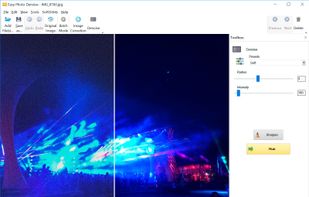
- Drag & drop noisy photos, or click Add Files to load a folder.
- Pick a preset: Light, Soft, Medium or Strong.
- Optionally tune Radius/Intensity, add sharpening, or fix color and gamma.
- Preview the before/after to confirm you remove grain but keep detail.
- Click Start to save one image, or run Batch Mode to batch denoise a whole shoot.
👍 Why choose it
- Removes every noise type: high-ISO grain, luminance noise, chroma color blotches and stray hot pixels.
- Preserves lines, textures and fine detail - avoids the over-smoothed look of aggressive filters.
- Batch denoise uses all CPU cores, so you can clean 1,000+ RAW or JPEG shots in one run.
- Automatic presets for high-ISO and medium-ISO noise reduction, plus manual control when you need it.
- Built-in resize, crop, rotate, brightness, contrast and gamma correction in the same window.
- Predictable, repeatable results - no cloud, no random AI re-imagining of your image.
- 100% offline: your photos never leave your PC, so privacy stays fully under your control.
- One-time purchase - no subscription, no per-image credits, no account or email signup.
- Lightweight noise reduction software that runs on Windows 7, 8, 10 and 11 without a dedicated GPU.
- 14-day money-back guarantee, so you can test the low-light noise cleanup risk-free.
Great for
- Rescuing noisy night, concert, party and event photos.
- Grainy phone camera photo fix without buying new gear.
- Pro-grade clarity without an expensive full-frame body.
- Prepping images for large-format or high-DPI printing.
- Cleaning old scans and archived JPEGs before sharing.
Does it support RAW? Yes - load camera RAW files and save clean JPEGs.
Will photos look blurry? No - it removes grain and chroma noise only, leaving edges sharp.
Is it private? Yes - unlike online denoisers, everything stays on your machine.
Does it handle batches? Yes - batch denoise entire folders in a single pass.
Do I need a GPU? No - it runs fast on any standard Windows PC.
A focused, privacy-first alternative to Topaz DeNoise AI, Neat Image and Noiseware.







 SoftOrbits added Easy Photo Denoise as alternative to Dfine
 SoftOrbits added Easy Photo Denoise as alternative to UniFab Denoise AI and DxO PureRAW
 SoftOrbits added Easy Photo Denoise as alternative to Topaz Photo, Super Denoising, Noise Ninja, Dfine and 3 more


 SoftOrbits


No comments or reviews, maybe you want to be first?