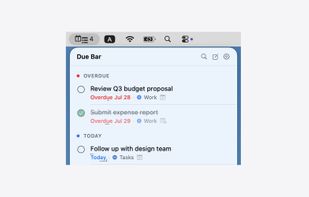
Due Bar lives in your menu bar and shows you exactly what's due today — from Google Tasks, Microsoft To Do, Apple Reminders, and your own local lists, all in one place.
Free for 7 days, then a one-time $7.99 unlock — no subscription.
Connect any combination of sources, including more than one Google or Microsoft account (work and personal side by side). Everything appears together, sorted by urgency: overdue, today, tomorrow, this week, and upcoming. A badge count on the menu bar icon tells you how many need attention — or shows a checkmark when you're clear.
Press a global hotkey from anywhere on your Mac to capture a new task or search your existing ones — no need to click the menu bar icon first. Type "Call dentist @fri #Personal" and the date and list are filled in for you.
When you want the whole picture, open the full window: smart views for Today, Upcoming, All, and No Date, every list grouped by source, and a notes panel beside your tasks.
Features:
- Google Tasks, Microsoft To Do, Apple Reminders, and Local Tasks in one unified list
- Multiple Google and Microsoft accounts at the same time, each labeled by email
- Apple Reminders stay in sync — add one with Siri and it shows up in Due Bar
- Set a time on a reminder and get notified at that time
- Local Tasks — no account needed, stored on your Mac
- Badge count for overdue and today's tasks
- Quick Capture: a global hotkey opens a floating panel to add a task from any app, instantly
- Type @tomorrow, @fri, @3d, or #ListName in Quick Capture — with autocomplete as you type
- Search tasks from Quick Capture and mark done, reschedule, or delete without touching the mouse
- Full window with Today, Upcoming, All, and No Date views, plus search and quick-add
- Customize your Quick Capture hotkey, or use the default
- Mark tasks done with a single click — ⌘Z to undo
- Reschedule tasks directly from the menu bar
- Open any task's notes in a full panel — phone numbers and links are tappable
- Edit or delete a task's notes right from the menu bar or the window
- Provider logos on every task so you always know where it lives
- Auto-syncs in the background every minute; Reminders update instantly
- Launch at login
- Private by design: sign-in through Apple's system sheet, tokens in your Keychain, no server of ours, no analytics







 is88 added Due Bar as alternative to Google Tasks, Todoist, TickTick and Microsoft To Do

 BUILDLOOP FOUNDRY LLC


