The desktop gadget Windows took away, rebuilt for Windows 10 and 11 — and it does not phone home.
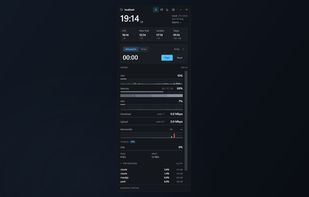
DualDash is a desktop widget that puts a world clock and a live system monitor side by side in a single frameless panel.
The clock supports a large primary time zone plus additional secondary zones drawn from the full Windows time zone database, with automatic daylight saving, 12- or 24-hour display, day-offset markers and an optional analog face. Alarms are set against any clock on the widget, with up to five per zone, day-of-week schedules, snooze and a choice of alert sounds. A timer and a stopwatch run alongside them.
The monitor reports CPU, memory and GPU usage with animated bars and history traces, CPU and GPU temperature where the hardware exposes it, disk read and write rates, and network throughput measured on the adapter the traffic actually takes, so an active VPN tunnel is not counted twice. Wi-Fi signal quality, link rate and a passive TCP retransmit reading are also shown, along with an expandable list of the top processes by CPU and memory.
The widget can float on the desktop, stay pinned above other windows, shrink to a compact clock or a horizontal mini bar, or minimise to the system tray. A click-through mode lets it sit over a full-screen game without stealing input, and global shortcuts toggle visibility, swap the two modules and turn click-through back off.
DualDash makes no network calls. There are no accounts, no advertising and no telemetry: performance data is read from local Windows counters and settings are stored in a single file on the device.







 Danilo Venom added DualDash as alternative to MyDesktopWidget
 Vol42 added DualDash as alternative to Rainmeter, Sidebar Diagnostics, Libre Hardware Monitor, XWidget and 13 more


No comments or reviews, maybe you want to be first?