DownGo icon
DownGo icon

DownGo

A fast, lightweight Windows download manager built with Python and PySide6.
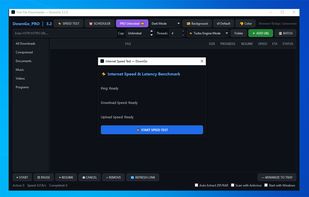
DownGo screenshot 1

Cost / License

  • Freemium (Subscription)
  • Open Source (MIT)

Platforms

  • Windows
0likes
0comments
0articles

Features

DownGo News & Activities

Highlights All activities

Recent activities

DownGo information

  • Developed by

    BD flagM.d Nurnobi Islam (Ether)
  • Licensing

    Open Source (MIT) and Freemium product.
  • Pricing

    Subscription that costs $4 per month + free version with limited functionality.
  • Written in

  • Alternatives

    51 alternatives listed
  • Supported Languages

    • English

AlternativeTo Categories

Video & MoviesDevelopmentFile Sharing

GitHub repository

  •  0 Stars
  •  0 Forks
  •  0 Open Issues
  •   Updated  
View on GitHub
DownGo was added to AlternativeTo by M-d-Nurnobi-Islam-Ether on and this page was last updated .
No comments or reviews, maybe you want to be first?

What is DownGo?

DownGo is a fast, modern download manager for Windows. It splits files into multiple simultaneous connections to download at your full internet speed, resumes broken or paused downloads exactly where they left off, and keeps your downloads folder tidy by automatically sorting files into Documents, Music, Videos, Programs, and Compressed folders as they finish.

A companion browser extension for Chrome and Edge quietly takes over your browser's downloads and hands them to DownGo, so every file gets the multi-connection speed boost without you having to do anything.

DownGo verifies every completed download with a SHA-256 checksum, supports authenticated and proxy-based downloads, lets you throttle bandwidth so downloads don't hog your connection, and can batch-import a whole list of URLs at once.

Upgrade to Pro for 16-thread acceleration, a download scheduler with auto-shutdown, one-click ZIP/RAR extraction, an automatic Windows Defender scan after each download, and a full set of custom themes — including Aurora Glass, a soft frosted-glass look with your own background image behind it.

Key features

  • Multi-connection accelerated downloads (up to 16 threads with Pro)
  • True pause/resume with byte-range resume support
  • Automatic file-type sorting into subfolders
  • SHA-256 checksum verification on every completed download
  • Chrome/Edge browser extension — auto-intercepts downloads
  • Batch URL import — paste a whole list at once
  • Bandwidth speed limiting and proxy/auth support
  • Live speed test tool (Pro)
  • Download scheduler with optional auto-shutdown (Pro)
  • Auto-extract ZIP/RAR after download (Pro)
  • Automatic antivirus scan after download (Pro)
  • 9 custom themes, including the frosted-glass "Aurora Glass" look (Pro)
  • Custom background image behind the UI, with one-click reset (Pro)
  • Custom accent color (Pro)
  • System tray integration — runs quietly in the background
  • Soft, adaptive window layout that adjusts to your window size

Official Links
