


DoubleXplorer
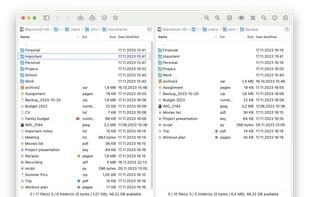
DoubleXplorer is a dual-pane file manager for macOS with a range of features, including a Command Palette, rich archive support (7z, Rar, Tar, Zip), file comparison, connection to servers (Dropbox, Microsoft OneDrive, SFTP, FTP), and more.
 EU
EU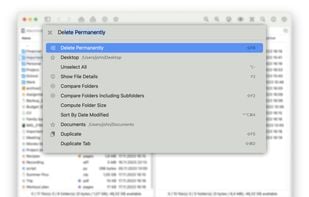

Features
- Dark Mode
- No Tracking
- Batch Rename Files
- Built-in viewer
- Ad-free
- File Tagging
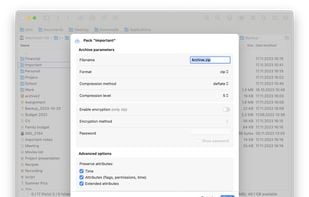
- File Archiving
- File Comparison
- Command palette
- Search in Archives
- Dual Pane Support
- Multi-tabs

- Support for Keyboard Shortcuts
- Image Preview
- Queued Operations
- File Search
- Support for SFTP
 Dropbox integration

DoubleXplorer News & Activities
Recent News
Recent activities
 POX added DoubleXplorer as alternative to CoverFlowFinder
 npn99f8hmj added DoubleXplorer as alternative to Synapse file manager
 RobertL87 added DoubleXplorer as alternative to Double Commander
 POX added DoubleXplorer as alternative to Bloom File Manager


DoubleXplorer information
Developed by
 Pawel Wójtowicz
 Licensing
Proprietary and Commercial product.Pricing
One time purchase (perpetual license) that costs $20.Alternatives
40 alternatives listedSupported Languages
- English
- Polish


What is DoubleXplorer?
DoubleXplorer is a dual-pane file manager for macOS with a range of features, including a Command Palette, rich archive support (7z, Rar, Tar, Zip), file comparison, connection to servers (Dropbox, Microsoft OneDrive, SFTP, FTP), and more.
Key Features:
-
Dual file panels with Tab key switching for efficient file management
-
Keyboard shortcuts for quick operation
-
Blazing fast performance
-
Optimized for mouse use
-
Establish connections with remote locations through various protocols (Dropbox, Microsoft OneDrive, FTP, SFTP)
-
Rich archive support for formats like 7z, Rar, Tar, Zip, and more
-
Command Palette - simplified task execution and folder navigation
-
Quick Search directly within the file panel
-
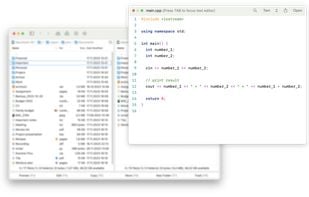
Built-in file preview with syntax highlighting
-
File Details panel with file details and small preview
-
Directory compare
-
Open/Edit files from servers and archives with automatic upload
-
Operations queue and file conflict recovery mechanism
-
Advanced file search with rule support and saved configurations
-
Virtual Folders for organizing files based on rules
-
Customizable appearance with personal color schemes
-
Side Bar and Bookmarks Bar for quick access to folders
-
Extensions with assigned keyboard shortcuts
-
Multiple tabs with the ability to move between windows
