





Dotflowy
4 likes
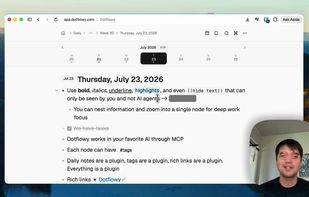
Dotflowy is the OSS Workflowy alternative. Free up your mind. Get your thoughts and tasks out. Organize them later, or don't. Agent-native.

Cost / License
- Freemium (Subscription)
- Open Source
Application typeApplication types
Platforms
- Online

Features
Highlights All activities
Dotflowy News & Activities
Recent activities
- dimashahbari liked Dotflowy
- Anastasia liked Dotflowy
- cameronpak liked Dotflowy
- Viktor Korobov liked Dotflowy
- cameronpak added Full-Text Search as a feature to Dotflowy
- cameronpak added Hierarchical Structure as a feature to Dotflowy
- cameronpak added Distraction-free as a feature to Dotflowy
- cameronpak added Support for MarkDown as a feature to Dotflowy


Developed by
 cameronapak
 Licensing
Open Source and Freemium product.Pricing
Subscription that costs from $5 per month + free version with limited functionality.Written in
Alternatives
5 alternatives listedBadge
Get an embeddable badge for DotflowySupported Languages

AlternativeTo Category
Office & ProductivityGitHub repository
- 87 Stars
- 12 Forks
- 52 Open Issues
- Updated





Trendy hues, broken views
Witness the Web fractured by boutique fads over baseline utility. Here, a rogue CSS framework forces the new OKLCH color space without a classic fallback, leaving an illegible mess on browsers just a few years old. All for a myopic engineering fetish: chasing wide-gamut shades mainstream sRGB screens cannot even deliver. Think of school labs, public libraries, policy-locked workstations, and refurbished PCs. Think of users sick of sprinting on the upgrade hamster wheel. Style — once a mere veneer over accessible content — devolves into an elitist gatekeeper, segregating people into first-class and forgotten.
No comments or reviews, maybe you want to be first?