

DoneSigned icon
DoneSigned icon

DoneSigned

 Like

DoneSigned is a free electronic signature app that lets you sign any PDF in your browser. You don't need an account, and your document is never uploaded. Each signature is confirmed with an email code and comes with an audit trail and a completion certificate.
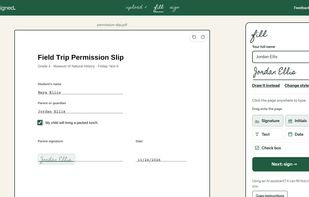
Fill and sign PDF documents

Cost / License

  • Free
  • Proprietary

Since

  • New

Platforms

  • Online
0likes
0articles
Save

Features

Properties

Features

Highlights All activities

DoneSigned News & Activities

Recent activities

DoneSigned information

AlternativeTo Category

Office & Productivity
DoneSigned was added to AlternativeTo by charmillon on and this page was last updated .

No comments or reviews, maybe you want to be first?

What is DoneSigned?

DoneSigned is a free e-signature tool for signing PDFs online without creating an account and without giving your document to a third party. The PDF opens, gets filled in and gets signed entirely in your browser. It never leaves your device. DoneSigned's servers keep only the evidence of the signing (document hashes and timestamped events), never the file.

It's built for small businesses, freelancers, landlords, HR teams and anyone else who needs to sign a contract, lease, NDA, offer letter or form quickly, without a subscription and without sending sensitive paperwork to someone else's cloud.

How it works

  • Upload: open any PDF, including restricted PDFs that block signing in other apps but have no password.
  • Fill: add your signature, initials, date, name and text fields anywhere on the page.
  • Sign: confirm your email with a one-time code, then click to sign. You download the signed PDF right away.

Signature options

  • Typed signatures in three handwriting-style fonts
  • Draw your signature with a mouse, finger or stylus
  • A standard conformed signature (/s/ Jane Smith), the format used in court e-filing and SEC filings

Evidence built into every signed PDF

  • A completion certificate page appended to the document
  • An audit trail of the signer's verified email, consent, the click to sign, server timestamps, IP address and the device
  • SHA-256 hashes that show whether the document was changed after signing
  • A tamper-evident digital signature (PAdES) on the final PDF
  • A machine-readable copy of the audit trail embedded in the file, so the evidence stays with the PDF
  • A free public verify page: drop in a signed PDF to check its signing record, and the file is still never uploaded

Free, private, and nothing to install

  • No account, no subscription, no trial that runs out
  • Works in any modern browser on Windows, Mac, iPhone, Android and Chromebook
  • No ads, and no documents stored on DoneSigned's servers