Doco Workspace icon
Doco Workspace icon

Doco Workspace

An open-source workspace where humans and AI agents safely edit the same live documents through stable blocks, version checks, MCP, CLI, and REST.
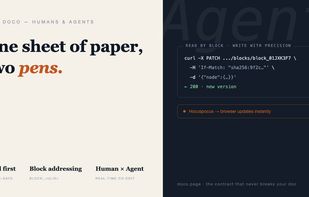
Doco overview: one sheet of paper, two pens—human and AI agent collaboration.

Cost / License

  • Free
  • Open Source (MIT)

Platforms

  • Online
  • Software as a Service (SaaS)
  • Self-Hosted
  • Docker
0likes
0comments
0articles

Features

  1.  Real time collaboration
  2.  Knowledge Management
  3.  Model Context Protocol (MCP) Support

Doco Workspace News & Activities

Highlights All activities

Recent activities

Doco Workspace information

  • Developed by

    Harry Smart
  • Licensing

    Open Source (MIT) and Free product.
  • Written in

  • Alternatives

    3 alternatives listed
  • Supported Languages

    • English

AlternativeTo Categories

DevelopmentOffice & ProductivityAI Tools & Services

GitHub repository

  •  4 Stars
  •  2 Forks
  •  1 Open Issues
  •   Updated  
View on GitHub

Popular alternatives

View all
Doco Workspace was added to AlternativeTo by songofhawk on and this page was last updated .
No comments or reviews, maybe you want to be first?

What is Doco Workspace?

Doco is an open-source collaborative document workspace built for humans and AI agents to maintain the same knowledge together. People write in a polished browser editor while agents connect through MCP, CLI, or a documented REST API.

The core difference is the editing contract. Every heading, paragraph, list item, and rich-content block has a stable address that does not change when the document is reorganized. Reads return a content version. Protected writes must match that version, so an agent working from stale context receives an explicit conflict instead of silently replacing a newer human edit. Block-level operations also limit the change to the intended paragraph, while batch operations remain atomic.

Agent writes flow through the same Yjs and Hocuspocus collaboration state as browser edits, so people can see changes appear in the live document. Doco supports structured search with source blocks, bounded reads, Markdown import and export, version snapshots, and rollback.

Connect Claude Code in one command, install Doco from Cursor Directory, or use the same MCP package from Codex, Gemini CLI, VS Code Copilot, Cline, Windsurf, and Continue. Doco is MIT licensed, self-hostable with Node.js and SQLite, and the hosted beta is free.

Official Links