
Dock Tile icon
Dock Tile icon

Dock Tile

 Like

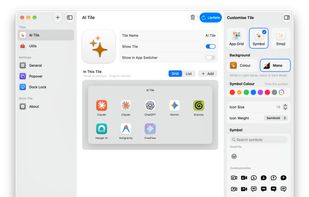
Folders for the Mac's Dock. Put a group of apps behind one Dock icon; click it and they pop up in a grid or list above the Dock, like a folder on iPhone. Includes Dock Lock (and a menu bar list of your tiles.
Dock Tile screenshot 1

Cost / License

  • Free
  • Open Source (MIT)

Since

  • New

GitHub

  • GitHub stars: 11

Platforms

  • Mac  macOS15+
0likes
0articles
Save

Features

Properties

Features

Highlights All activities

Dock Tile News & Activities

Recent activities

Dock Tile information

AlternativeTo Category

OS & Utilities

GitHub repository

  •  11 Stars
  •  2 Forks
  •  19 Open Issues
  •   Updated  
View on GitHub

Popular alternatives

View all
Dock Tile was added to AlternativeTo by rkarthikco on and this page was last updated .

No comments or reviews, maybe you want to be first?

Official Links

What is Dock Tile?

Dock Tile brings folders to the Mac's Dock. Put a group of apps behind one Dock icon, called a tile; click it and its apps pop up in a grid or a list right above the Dock, like a folder on iPhone. A Dock that had grown too long to read becomes a handful of tiles, one per task: work, development, media, AI tools.

Each tile is a real Mac app with its own icon, so it sits, magnifies and shows its name like everything else in your Dock. You set tiles up in the Dock Tile app: add apps and folders, drag them into order, and pick an icon. That can be a grid of the tile's own apps, a symbol or an emoji, on colour or a plain background. On macOS 26 and later, tiles follow your Light, Dark, Clear and Tinted icon style.

Not sure where to start? Smart Add suggests ready-made tiles from the apps you actually use, learned on your Mac; that data never leaves your device. Nothing reaches your Dock until you add it.

More in the box:

  • Menu bar list of your tiles and their apps, handy when the Dock is hidden
  • Ghost mode: tiles stay out of Command-Tab by default, with a per-tile switch to show them
  • Dock Lock: on Macs with more than one display, keeps the Dock on the screen you choose instead of jumping between them, remembering a display for each set of screens
  • Keyboard friendly: arrow keys move through a tile's apps, Return opens, Esc closes
  • Tiles start at login, and updates install automatically
  • In English, 简体中文, 日本語, Deutsch, Русский and Français

Free and open source (MIT), with no account, ads or in-app purchases. A direct download rather than the App Store, because it builds a small app for each tile and edits your Dock, which App Store apps aren't allowed to do. Requires macOS 15 or later on a Mac with Apple silicon.