Your Dock launches apps. It doesn't organize them — or let you make them yours.
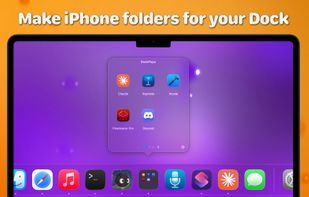
DockPops adds beautiful, customizable folders to your Dock. Click a DockPops icon and a grid of your apps, files, folders, and links pops up right where you'd expect it. Then make each one yours — a theme, a gradient, a photo, a glass finish — and watch its Dock icon match.
ORGANIZE YOUR DOCK
– Group up to 25 apps, files, or folders in a Pop
– Create up to 20 Pops and swipe between them
– Give any Pop its own icon in your Dock
– Group related Pops behind one of those icons and swipe through just that set
– Drag in apps, files, and folders from anywhere on your Mac; browse folders right inside a Pop
– Build Pops fast with a drag-and-drop editor, and launch everything at once with Open All
MAKE IT YOURS
– A dozen built-in themes, or save your own and reuse it across Pops
– Style each background: color, gradient, or your own photo — with a Glass Effect slider
– Add a single-color or gradient border
– Set the app-label font, weight, size, and color
– Each Pop's Dock icon matches its theme automatically — or give it its own look
SMART, AND FREE TO START
– Apple Intelligence suggests apps that belong in your Pops — on device (macOS 26)
– Pair with the free DockPops Companion to pin each Pop as its own Dock tile
Free with 2 Pops and 6 items each. Unlock everything with DockPops Premium — one purchase, no subscription.
Native Mac app. No tracking, no ads. Fully sandboxed. Requires macOS 14 or later. Apple Intelligence features require macOS 26.







 Applacat LLC
No comments or reviews, maybe you want to be first?