diskmap for Mac icon

diskmap for Mac

 Like

Partition map and layout planner for external drives on macOS. Every change is a diskutil command you see before it runs.
diskmap for Mac screenshot 1

Cost / License

  • Free
  • Open Source (MIT)

Application type

Since

  • New

Updated

  • Updated Nov 2026

Platforms

  • Mac
0likes
0articles
Save

Features

Properties

Features

Highlights All activities

diskmap for Mac News & Activities

Recent activities

diskmap for Mac information

AlternativeTo Category

OS & Utilities

GitHub repository

  •  0 Stars
  •  0 Forks
  •  0 Open Issues
  •   Updated  
View on GitHub
diskmap for Mac was added to AlternativeTo by Vitali Zapatylak on and this page was last updated .

No comments or reviews, maybe you want to be first?

Official Links

What is diskmap for Mac?

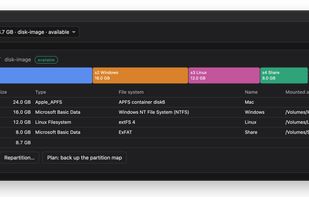
diskmap shows the partitions of every disk as a map and lets you repartition external drives: add partitions after the last one or into a gap, shrink or grow APFS and HFS+ partitions in place, format, mount and unmount.

Each layout becomes a plan — a list of ordinary diskutil commands, every step marked as reversible, irreversible or destroying a volume. You review the plan, then apply it or copy it into Terminal and run it by hand.

Formats: APFS, HFS+, exFAT and FAT32 out of the box; NTFS and ext4 when ntfsprogs, e2fsprogs or Paragon is installed. "diskmap doctor" shows which formats your Mac can create and which of them it can then mount.

Safety: the partition map is backed up before every write, writing needs sudo in Terminal and typing the disk's name, and internal and startup disks are always read-only. No network access.

Works from the command line and from a native window. It is not a backup, cloning or data recovery tool.