
disk-insight icon
disk-insight icon

disk-insight

disk-insight is a local-only disk usage viewer for Windows. It reads NTFS Master File Table (MFT) data directly for fast scanning and presents the result as a tree-first view, so you can expand folders and see where storage is used before deciding what to review.
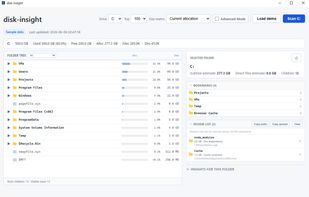
Main tree view with occupancy bars and size column, a drive summary, bookmarks, and a session-only review list.

Cost / License

  • Free
  • Open Source (MIT)

Platforms

  • Windows  Windows 10 or later. NTFS volumes are the primary supported target; other file systems may have limited or unsupported behavior. Administrator rights are recommended for a full NTFS MFT scan.
0likes
0comments
0articles

Features

Properties

  1.  Privacy focused

Features

  1.  Works Offline
  2.  No registration required
  3.  Ad-free
  4.  No Tracking
  5.  Portable

 Tags

disk-insight News & Activities

Highlights All activities

Recent activities

disk-insight information

AlternativeTo Category

System & Hardware

GitHub repository

  •  0 Stars
  •  0 Forks
  •  0 Open Issues
  •   Updated  
View on GitHub
disk-insight was added to AlternativeTo by iwadjp on and this page was last updated .
No comments or reviews, maybe you want to be first?

Official Links

What is disk-insight?

disk-insight is a local-only disk usage viewer for Windows. It reads NTFS Master File Table (MFT) data directly for fast scanning and presents the result as a tree-first view, so you can expand folders and see where storage is used before deciding what to review.

The main window shows a folder tree with an occupancy bar and a size column, a drive summary (used, free, allocated, file and directory counts), and an Insights panel listing the largest items under the selected folder. A view selector switches between All, Large review, Reviewable areas and Caution areas; these groupings are path-based heuristics meant as starting points for manual review, not recommendations to delete anything. Bookmarks persist across sessions, and a session-only review list can batch-copy paths. Explorer handoff actions (Show in Explorer, Select file, Show properties) are available.

disk-insight does no network communication, has no telemetry or analytics, and includes no auto-updater. App-managed data such as the scan cache and bookmarks is stored only in the local per-user application data folder. By default the app runs in Normal Mode with no destructive file operations shown; a non-persistent Advanced Mode can unlock Move to Recycle Bin with per-item confirmation. Delete, rename, cut and paste are not implemented.

Requirements: Windows 10 or later, NTFS volumes as the primary target, and administrator rights recommended for a full MFT scan. The current release, v0.6.0, is a pre-release for evaluation and ships as an unsigned Windows x64 build. Licensed under the MIT License; source code and releases are published on GitHub.