Disk Drive Cleaner Pro icon

Disk Drive Cleaner Pro

 Like

Windows disk space analyzer and cleaner with a storage map, safe junk cleanup, duplicate finder, developer cleanup, instant file search and disk health. No account or telemetry.
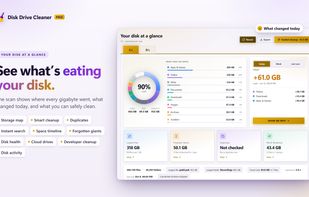
Disk Drive Cleaner Pro screenshot 1

Cost / License

  • Pay once
  • Proprietary

Application type

Platforms

  • Windows
0likes
0articles
Save

Features

Properties

Features

Highlights All activities

Disk Drive Cleaner Pro News & Activities

Recent activities

Disk Drive Cleaner Pro information

Disk Drive Cleaner Pro was added to AlternativeTo by Czopp on and this page was last updated .

No comments or reviews, maybe you want to be first?

Official Links

What is Disk Drive Cleaner Pro?

Disk Drive Cleaner Pro is a Windows app that shows what takes up space on a drive and helps free it safely. It runs with normal user rights (no administrator prompt) and works entirely offline: there is no account, no ads and no telemetry.

A single scan produces a ring chart of space by category, an interactive storage map (treemap) of every folder, by folder or by file type, and a timeline of free space over time.

Main features:

  • Smart cleanup of temporary files, caches, crash dumps, old installers and leftovers of uninstalled programs, sorted into "safe" and "worth a look". Every item is listed before anything is removed, and personal files go to the Recycle Bin.
  • Duplicate finder verified by full content hash, with a suggested copy to keep, plus a separate view for similar photos and videos.
  • Largest files and "Forgotten giants": big files untouched for months or years.
  • Instant search over a local index of all file and folder names, with filters for type, size and date, wildcards and saved searches.
  • Cloud drives overview for OneDrive, Dropbox, iCloud and Google Drive: shows which files take local space and frees it while keeping them in the cloud.
  • Developer cleanup: trims Rust and JavaScript build caches, and removes build folders of idle projects and finished git worktrees.
  • Timeline with today / this week / scan-to-scan comparisons, and notifications when a drive runs low or a folder suddenly grows.
  • Disk health (condition, life left, temperature, power-on hours), a built-in speed test and live per-app disk activity.
  • Scheduled background scans and optional weekly cleanup with a history.

Available in 25 languages, with light, dim and dark themes, keyboard navigation and screen-reader support. Requires Windows 10 (1809) or later, x64.
