


Directory Opus
232 likes
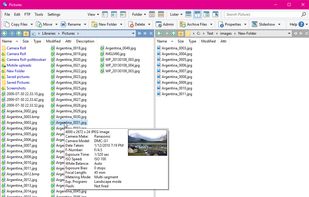
Complete Explorer alternative with dual-pane navigation, folder tabs, batch renaming, built-in image and document viewer, portable device access, scriptable interface, archive and metadata support, robust search, color coding, sync tools, and high DPI compatibility.


Features
Highlights All activities
Directory Opus News & Activities
Recent News
No news, maybe you know any news worth sharing?
Share a News Tip
Recent activities
- PatDaddy23 liked Directory Opus
 koimsurai added Directory Opus as alternative to Arke
 Causal-Map added Directory Opus as alternative to Whippet
 K0RR added Directory Opus as alternative to Nemo
 powervac added Directory Opus as alternative to Alternate Commander
 AchoDev added Directory Opus as alternative to Dorian
 Paul added Directory Opus as alternative to FileOctopus
 4dir added Directory Opus as alternative to 4Dir
 TheTriumphantFox added Directory Opus as alternative to WinThunar
 Mauricio B. Holguin added Directory Opus as alternative to Crust Commander


Windows Apps
A list with 328 apps by christineconnor without a description.



Windows
I use these software on Windows


Windows 10 Multimedia Workstation Tools
A list with 69 apps by vguerreiro without a description.
Developed by
 GP Software
Licensing
Proprietary and Commercial product.Pricing
One time purchase (perpetual license) ranging between $32 and $58.Rating
Average rating of 3.9Alternatives
111 alternatives listedBadge
Get an embeddable badge for Directory OpusSupported Languages


Comments and Reviews
I used DOpus for years, but I've become jaded of their pricey upgrade fees. I recently upgraded (paid) to their latest version 13, but was completely underwhelmed. I tried to get a refund and go back to version 12, but they refused. They said it's my fault for not using their free trial. Yep, I regret supporting them. Never again.
I spent weeks downloading over 12 different alternative file explorers. I tested the features that I valued most in each of them. I finely decided to use the 30 free trial of Directory Opus. By the end of the 30 days, I was in love and bought 3 copies of the software to use on my 3 computers. After using the product now for 4 months I don't know how the universe existed without Directory Opus. I can’t find the words to tell you how awesome this product is. All day every day I interact with files on my computer. Directory Opus saves me a TON of time interacting with my files. I can customize the interface to work with my workflow. With the old Microsoft Windows 10 file explorer I used to have 3-4 windows open all the time to interact with groups of files. I love the Tab feature in Directory Opus. I now just have 1 window open. There are a 100+ features that I've fallen in love with. I know it seams out of the normal to "pay" for a file explorer, however if you work with files all day long, your time is worth something as well. Directory Opus has more than paid for itself in how much time it has saved me.
DOpus is fully customizable and has all the features one looks for in a dual-pane file explorer.
Is it expensive? Yes. And that's pretty much the only negative I can think of. If you're a data hoarder doing lots of file/folder management stuff, this is the best there is.
Features: 5/5 without being overwhelming. Stability: 5/5 rock solid. Support: 5/5 I've been using it for decades (currently on v.11) the few times I needed support it was provided almost instantly.
Fun fact: DOpus roots are from the 80ies. JPDirUtil was the name of it's precedent it ran on Amigas.
I've been using this app for about 5 years now. It's by far the most customizable from the massive amount of settings to completely changing the UI to your desire. I have tested out all other explorer replacements including XYplorer but none of them come close. XYplorer is 2nd IMO, which does a great job visually presenting files and folders (thanks to not using the windows shell to general thumbnails) but severely lacks in customization, at least in comparison to DOPUS. There are a lot of small QOL things that DOPUS can do that other programs cannot and you really notice those if you go back to other programs. The only downside to DOPUS is it's reliance on the windows shell for certain things like thumbnail generation, which will restrict you to a max thumbnail size of 256x256. You can get around this for things like videos in which you can use DOPUS thumbnailing but compared to windows shell + Icaros the resultant thumbs are very subpar. This is not enough to remove a star and I rate this program a 5/5 as it is currently the leader in file managers.
A dual-pane file manager that has good preview support. Lets me scan multiple files, identify them by preview, rename, and file them away with efficiency not matched by anything else I've tried!
A great tool, so far the best dual panel manager I encountered