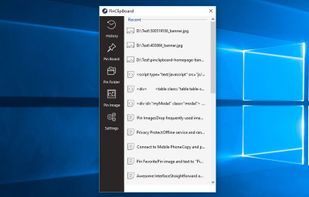
A beautiful, Windows 11-style Clipboard History Manager for Linux 💅.
Cost / License
- Free
- Open Source (MIT)
Platforms
- Linux

Diodon is described as 'Aiming to be the best integrated clipboard manager for the Gnome/Unity desktop' and is a clipboard manager in the office & productivity category. There are more than 100 alternatives to Diodon for a variety of platforms, including Mac, Windows, Linux, iPhone and iPad apps. The best Diodon alternative is CopyQ, which is both free and Open Source. Other great apps like Diodon are Ditto, Planck, CopyCat Clipboard and Maccy.
A beautiful, Windows 11-style Clipboard History Manager for Linux 💅.

Clipcomrade is Windows clipboard manager. Remembers everything that you put to the clipboard, easy paste/drag anything from clipboard history, access …

PasteFast is a lightweight, fast clipboard history manager for macOS. Double-press your hotkey to instantly access your clipboard history featuring both text and images. Customizable shortcuts, automatic panel hiding, source app identification, and minimal resource usage.


SmartReact is an awesome little utility combining functionality in one tool, you usually need multiple utilities for! For a start:


Say goodbye to losing important snippets of text and images! Clip Log is the ultimate clipboard manager, combining intelligent organization, real-time saving, and privacy-first design. Designed to simplify your workflow, Clip Log ensures that everything you copy is instantly...


Pasteboard history for macOS done right. Using the proven UI style of Alfred, Spotlight etc. Use fuzzy searching to find what you want to paste.


CleanBoard is a lightweight clipboard utility for macOS that removes unwanted formatting from copied text—so you can paste clean, plain text into any app with ease.

Mac clipboard history manager inspired by Windows, holding text, images, files, folders, and groups. Customize up to 50 items. Access via shortcuts and command keys. Opens at the bottom right, with a status menu bar icon. Provides comprehensive usage tips.


Keyboard-driven multiple-clipboard manager for Windows: hold Ctrl, tap V to walk back through everything you have copied, release to paste - no window, no mouse. A .NET 10 + WPF reimplementation of Clipjump, shipped as one self-contained portable exe.


clipLogger logs text copied to the clipboard, putting everything in one textbox for easy access. Clipboard captures can be separated & labeled with a timestamp, or just appended by themselves. It can also log the paths of copied or dragged&dropped files.


Auto-copies any text the moment you select it — no Ctrl+C needed. Provides deep click paste and a searchable local clipboard history. Works on Mac and Windows.