
Deviload icon
Deviload icon

Deviload

A clean Windows desktop front-end for yt-lp: paste a link, pick quality, download. Playlists,chapters, trim, GIF, one-click YouTube sign-in, RU/E.
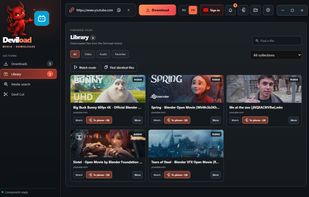
Deviload screenshot 1

Cost / License

  • Free
  • Open Source (MIT)

Application type

Platforms

  • Mac
  • Windows
  • Linux
0likes
0articles
Save

Features

Properties

  1.  Privacy focused

Features

  1.  Dark Mode
  2.  Ad-free
  3.  No registration required
  4.  No Tracking
  5.  YouTube Downloader

Deviload News & Activities

Highlights All activities

Recent activities

Deviload information

AlternativeTo Category

Video & Movies

GitHub repository

  •  31 Stars
  •  4 Forks
  •  0 Open Issues
  •   Updated  
View on GitHub
Deviload was added to AlternativeTo by Paul on and this page was last updated .

No comments or reviews, maybe you want to be first?

Official Links

What is Deviload?

Desktop app for downloading video and music with yt-dlp, built with Rust and Tauri 2. Windows is the main target; the macOS and Linux builds come from CI, and the Mac one has been tried on a real Mac. The interface is available in English, Russian and Spanish and switches instantly from the language menu in the top bar. Features

  • Downloads from YouTube, YouTube Music and every other site yt-dlp supports. Best, 1080p, 720p or 480p video as MP4 (plays everywhere, H.264 and AAC when the site has them), MKV (the best streams as they are) or WebM; MP3, FLAC or WAV audio. Profiles for music, archive, phone (MP4) and maximum quality.
  • One link field. Paste one or more links, or drop a link from the browser anywhere on the window. A preview with the title, duration and the real streams of the source appears by itself; an exact stream can be picked.
  • Playlists: whole list, first N items or exact ranges, a track picker by title, and splitting by chapters. Subtitles, SponsorBlock removal and a per-format download archive.
  • Live streams record from the moment you add the link: the task shows the time recorded and the size so far, "Stop recording" keeps what was recorded as a normal MP4, and an optional limit (15 minutes to 24 hours) stops it by itself. With a start time, a length and "Repeat every day" it records the same stream at the same time daily. A recording cut off when Deviload closes is saved at the next start.
  • Watched channels and playlists: new videos in a followed list download by themselves, in the format picked when the list was added. Lists are checked every 6 hours while Deviload runs, including from the tray.
  • Follow an artist: give the link of an artist's channel on YouTube or YouTube Music, and every album, EP and single from its Releases tab downloads as MP3 or FLAC into Artist / Album folders, with track numbers, the release year and a square cover. The albums already out can be fetched too; new releases follow by themselves.
  • For Jellyfin, Emby and Plex: one subfolder choice lays videos out as dated episodes of their channel (Channel / Season year / Channel - date - title) with an .nfo, a thumbnail, a tvshow.nfo and a poster, and music by artist and album. With the server address and an API key, Deviload asks the server to scan once the downloads finish.
  • Queue with 1 to 8 parallel downloads, pause, resume, reorder, delayed start, automatic retry of temporary network errors, a per-task log and readable error hints. The queue survives restarts; interrupted tasks resume only when you ask. It can put the computer to sleep or shut it down when the downloads finish, after a minute you can cancel.
  • Self-healing downloads: known failures are fixed once before a task gives up: your Deviload sign-in when YouTube asks to sign in, the usual quality when an exact stream is gone, a yt-dlp update (when nothing is downloading) when YouTube changes its protection, and a pause after rate limiting.