
VO-VE icon
VO-VE icon

VO-VE

VO-VE (View Only — View Everything) is a lightweight graphics viewer for Windows and Linux, created for everyday work in a print shop. It helps designers and prepress professionals identify artwork visually, find files and inspect them without opening a graphics editor.
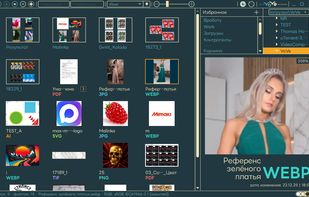
Zoom in the viewing window

Cost / License

Platforms

  • Windows
  • Linux
0likes
0articles
Save

Features

  1.  Batch Rename Files
  2.  Prepress
  3.  Thumbnails
  4.  Integrated PDF Viewer

VO-VE News & Activities

Highlights All activities

Recent activities

VO-VE information

AlternativeTo Categories

File Management, Office & Productivity

GitHub repository

  •  1 Stars
  •  0 Forks
  •  0 Open Issues
  •   Updated  
View on GitHub
VO-VE was added to AlternativeTo by Vlad Pukenshtein on and this page was last updated .

No comments or reviews, maybe you want to be first?

Official Links

What is VO-VE?

VO-VE (View Only — View Everything) is a lightweight graphics viewer for Windows and Linux, created for everyday work in a print shop. It helps designers and prepress professionals identify artwork visually, find files and inspect them without opening a graphics editor. The application works directly with existing folders on local drives, SMB network shares and NAS devices. There is no need to import files into a catalog or organize them into a separate media library. A thumbnail grid and a large viewing pane provide an overview of the folder and a closer look at the selected file. Graphics and document previews VO-VE supports formats commonly encountered in printing and design, including PDF, AI, CDR, PSD, PSB, SVG, EPS, InDesign and Affinity documents, alongside common raster images and selected camera RAW formats. Preview capabilities depend on the format. CDR files are displayed using their embedded previews, without launching CorelDRAW. InDesign and Affinity previews also depend on preview data saved in the document. PS, EPS and classic AI files require a separately installed Ghostscript. VO-VE is not a replacement for native editors or a print-production validation tool. Browsing and search

  • Zoom and pan within the viewing pane.
  • Browse pages of multipage PDFs and see page counts.
  • Identify folders through thumbnail mosaics of their contents.
  • Display files from an entire subfolder tree together.
  • Filter the current folder instantly by filename.
  • Search indexed locations using separately installed Everything on Windows or plocate on Linux.
  • Sort naturally by name, or by date, extension and size.
  • Reuse previously generated previews through a size-limited disk cache. Working with files VO-VE includes copying, moving, folder creation, single and batch renaming, drag-and-drop, and trash recovery. Frequently used locations, including printer hot folders, can be added to Favorites. Files can be opened in their associated applications. The interface offers four themes, color-coded format labels and ICC profile information. Core viewing and file operations do not require an internet connection. VO-VE is free and open source. It focuses on viewing and basic file management rather than image editing, tagging or catalog management. The project is currently in alpha.
