
cut.audio Editor icon

cut.audio Editor

 Like

Free online multitrack audio editor that cuts, arranges and mixes audio in the browser and exports to MP3, WAV, FLAC or OGG.
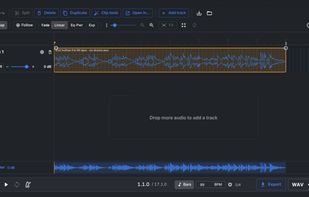
Main View of the Timeline

Cost / License

  • Freemium (Subscription)
  • Proprietary

Since

  • New

Platforms

  • Online
0likes
0articles
Save

Features

Features

Highlights All activities

cut.audio Editor News & Activities

Recent activities

cut.audio Editor information

  • Developed by

    DE flagcut.audio
  • Licensing

    Proprietary and Freemium product.
  • Pricing

    Subscription that costs $6 per month + free version with limited functionality.
  • Alternatives

    10 alternatives listed
  • Badge

    Get an embeddable badge for cut.audio Editor
  • Supported Languages

    • English
    • German
    • Chinese
    • Japanese
    • Portuguese
    • Spanish
    • French
    • Korean
    • Italian
    • Polish
    • Turkish
    • Vietnamese

AlternativeTo Category

Audio & Music

Popular alternatives

View all
cut.audio Editor was added to AlternativeTo by solidgrid on and this page was last updated .

No comments or reviews, maybe you want to be first?

What is cut.audio Editor?

cut.audio Editor is a free audio editor that runs in your browser. Drop in one or more files and each one gets its own track on a multitrack timeline. You can split clips at the playhead, trim edges, move and copy clips, add fades, and set levels with per-track faders, pan, mute and solo. Export the result as a single MP3, WAV, FLAC or OGG file.

It handles the everyday jobs people often open Audacity for: cutting a recording, taking a cough out of a podcast, putting a voice over music, or combining several files into one.. There's also a master volume and speed, a metronome with tap tempo, a bar/beat grid with snap, a loop area, and an In/Out section you can trim out of selected clips. Every step can be undone.

It opens MP3, WAV, FLAC, OGG, AIFF, M4A, AAC, Opus, WMA, AMR and audio from MP4, MOV, WebM and MKV video, up to one hour per file. Editing and export run locally in the browser. You can save the whole session as a .cut project file and reopen it later.

The free tier gives you 3 tracks per project and 10 exports a day. A Pro subscription removes both limits and also unlocks the cut.audio Studio desktop app for Windows.