

CueClip icon
CueClip icon

CueClip

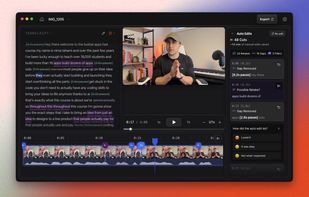
A macOS video editor for tutorials, courses, demos, and talking-head recordings. It captures screen, camera, and microphone input; uses transcript-based edits and AI cleanup for retakes, filler words, and pauses; then exports video or XML timelines to major editors.
CueClip screenshot 1

Cost / License

  • Pay once or Subscription
  • Proprietary

Platforms

  • Mac
0likes
0articles

Features

Properties

  1.  Privacy focused
  2.  Lightweight
  3.  AI-Powered

Features

  1.  Ad-free
  2.  Screen Sharing
  3.  Support for Layers
  4.  Hardware Accelerated
  5.  No registration required
  6.  Live Preview
  7.  Support for 4K
  8.  Non Destructive Editing
  9.  Dark Mode
  10.  Screen Recording

CueClip News & Activities

Highlights All activities

Recent activities

CueClip information

  • Developed by

    CA flagMokline
  • Licensing

    Proprietary and Commercial product.
  • Pricing

    One time purchase that costs from $149, and / or subscription that costs from $29 per month.
  • Alternatives

    5 alternatives listed
  • Badge

    Get an embeddable badge for CueClip
  • Supported Languages

    • English
CueClip was added to AlternativeTo by nimati on and this page was last updated .
No comments or reviews, maybe you want to be first?

Official Links

What is CueClip?

CueClip is an AI-powered video editor for Mac designed to make editing long-form videos faster and less repetitive.

It can automatically detect and remove retakes, filler words, long pauses, and mistakes, helping creators get through the first edit much faster. You can also edit directly from the transcript, record your screen, camera, and microphone, add captions, clean up background noise, and enhance voice audio.

CueClip is especially useful for tutorials, online courses, product demos, educational videos, and other talking-head or screen-recorded content.

Once your edit is ready, you can export a finished video directly from CueClip or export the timeline to Final Cut Pro, Adobe Premiere Pro, or DaVinci Resolve for further editing.

CueClip also supports bring-your-own API keys for supported AI providers, giving users more control over the AI services they use and how they pay for processing.

Key features include automatic retake and mistake detection, filler word and pause removal, transcript-based editing, screen and camera recording, captions, audio enhancement, background noise removal, video export, and timeline export to professional video editors.

CueClip Videos
