CremaStudio icon
CremaStudio icon

CremaStudio

CremaStudio is a fast, native image editor for macOS - open PSD and RAW files, edit with full layers, masks, and non-destructive adjustments, then export to open formats.
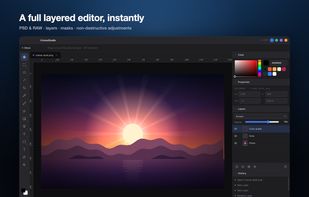
CremaStudio screenshot 1

Cost / License

  • Subscription
  • Proprietary

Application type

Platforms

  • Mac
1like
0comments
0articles

Features

Properties

  1.  Privacy focused
  2.  Lightweight

Features

  1.  Support for Layers
  2.  Dark Mode
  3.  Custom Brushes
  4.  Built-in Color Picker
  5.  Works Offline
  6.  Ad-free
  7.  Live Preview
  8.  No Tracking
  9.  No Coding Required
  10.  Non Destructive Editing

CremaStudio News & Activities

Highlights All activities

Recent activities

CremaStudio information

  • Developed by

    US flaggetapps.cafe
  • Licensing

    Proprietary and Commercial product.
  • Pricing

    Subscription ranging between $10 and $15 per month.
  • Alternatives

    8 alternatives listed
  • Supported Languages

    • English

AlternativeTo Category

Photos & Graphics
CremaStudio was added to AlternativeTo by getapps on and this page was last updated .
No comments or reviews, maybe you want to be first?

What is CremaStudio?

CremaStudio is a fast, native image editor for macOS - open PSD and RAW files, edit with full layers, masks, and non-destructive adjustments, then export to open formats.

A real layered editor that launches in a blink and stays out of your way: tools on the left, layers and adjustments on the right, your image in the middle. Every change lands on a layer you can re-order, mask, or undo.

  • Full layered editing - a complete layer stack with groups, masks, opacity, and blend modes; rearrange, clip, merge, and flatten without baking anything in.
  • Opens PSD & RAW - import layered PSD files with their layers intact, develop camera RAW, and open PNG, JPEG, WebP and TIFF.
  • Non-destructive adjustments - Curves, Levels, Hue/Saturation, Color Balance, Vibrance, Exposure and more as live adjustment layers you can re-edit any time.
  • Free Transform - scale, rotate, skew, distort, and corner-pin (perspective) any layer with a live preview.
  • Selections that stick - marquee, lasso, magic wand, quick selection, and Color Range, with feather, expand, contract, and invert.
  • Filters with live preview - Gaussian and Motion blur, Sharpen, High Pass, and Add Noise, each with a slider you can dial in before you commit.
  • Layer styles - drop shadow, inner shadow, outer and inner glow, colour and gradient overlay, bevel, and stroke, all from one Blending Options panel.
  • Retouch & remove - content-aware fill and spot healing rebuild an area from the pixels around it, so objects and blemishes disappear cleanly.
  • Export anywhere - save to open formats (PNG, JPEG, WebP, TIFF, ORA) or keep a native .pho project that preserves every layer.