CopiioAI
Overview
CopiioAI is a powerful tool that provides:
- Natural language interface for accessing internet data
- Chrome extension for non-developers to access API data
- Query APIs using natural language instead of Postman
- Turn browser API requests into chat interfaces
It allows you to access publicly available internet data. CopiioAI can retrieve public information online and securely connect to the data sources you choose. It only operates within the access you explicitly allow, without writing a single line of code.
If your browser can access it, CopiioAI can access it.
Getting Started
To start asking questions:
- Find a topic you like in the Knowledge Base and click "Add to My Knowledge Base"
- Or, go to Community > Share Received and click "Accept" on any knowledge shared with you
Once added, you're ready to start asking!
API Chat Interface
CopiioAI lets you talk to your APIs — transforming them into a live chat interface without building a frontend. Instead of writing UI code or repetitive integration layers, you can directly operate your APIs and data through conversation.
Three Ways to Create API-Powered Tools
We demonstrate three different ways to create API-powered tools:
1. Generate a tool automatically from intercepted browser requests
Automatically capture and convert browser requests into usable tools.
2. Import a custom API configuration via JSON
Configure your API tool by providing:
- url
- method
- query
- headers
- body
3. Create a tool from a URL
Let CopiioAI read and process live page content directly from a URL.
Key Features
? No Code Required - Access data without writing any code
? Natural Language - Query APIs using everyday language
? Secure Access - Only operates within explicitly allowed permissions
? Flexible Configuration - Multiple ways to create and manage API tools
? Browser-Based - If your browser can access it, so can CopiioAI
CopiioAI - Making data access simple and conversational





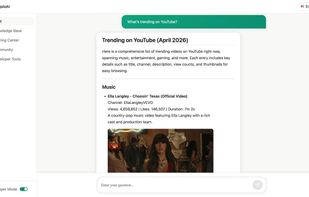


 copiioai added CopiioAI as alternative to Postman and Perplexity
No comments or reviews, maybe you want to be first?