





Copia (Clipboard History)
Like
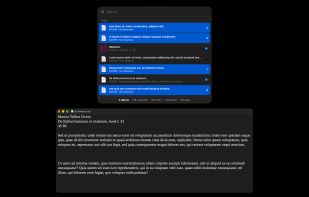
Free, open source clipboard history for Mac. Option-Command-C shows every copy, and Return pastes the picked ones into the app in front, several at once. A paste queue pastes copies one by one with Command-V.


Features
Highlights All activities
Copia (Clipboard History) News & Activities
Recent activities
- Herman Harazha updated Copia (Clipboard History)
- Herman Harazha added Copia (Clipboard History)
 Herman Harazha added Copia (Clipboard History) as alternative to Maccy, Paste, ClipBook, Pastebot and 3 more

Developed by
 Herman Harazha
Licensing
Open Source (MIT) and Free product.Written in
Alternatives
7 alternatives listedBadge
Get an embeddable badge for Copia (Clipboard History)Supported Languages

AlternativeTo Category
Office & ProductivityGitHub repository
- 5 Stars
- 0 Forks
- 0 Open Issues
- Updated


No comments or reviews, maybe you want to be first?