Turn any image folder into a fast, private contact sheet for your Mac.
Finder is fine for a handful of files. It falls apart when you need to review a whole shoot, compare exports, sort through screenshots, or find one reference inside a messy project archive.
Contact Sheet is built for that exact moment: choose a folder, see everything visually, find the image you need, and move on.
No import step. No cloud account. No catalog to maintain.
Your files stay where they are. Your photos stay on your Mac.
The Missing Middle Between Finder And A Photo Library
Most photo apps want to become the place where your photos live.
Contact Sheet does not.
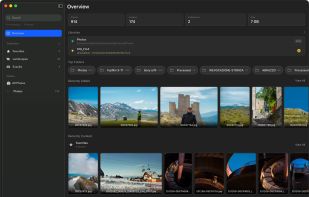
It is a lightweight review space for folders that already exist on your Mac. Open a folder and Contact Sheet turns it into a visual workspace: the folder structure stays available, the images are laid out for quick scanning, and the original file opens in a focused viewer when you want a closer look.
That makes it useful before an import, before a handoff, before cleanup, or any time you need to look through image files without committing them to a catalog.
Built For Real Workflows
Use Contact Sheet when you need to move through a lot of images without breaking your rhythm.
It is made for client selects, design references, screenshots, generated assets, moodboards, export folders, RAW review passes, and project archives where the images are already organized well enough on disk.
You can skim a folder visually, narrow attention to the images that matter, keep track of promising files, inspect details, and send the right photo to Finder or your editor when it is time to act.
The interface is quiet and Mac-like on purpose. It gives you the tools you need for review, selection, and inspection without turning the session into library management.
Stay In Control Of Your Files
Contact Sheet does not move, rename, import, upload, or reorganize your images.
It reads from the folder you choose and keeps your existing structure intact. Favorites, collections, tags, keyboard shortcuts, and viewing preferences are there to help you browse faster, not to lock your images into a proprietary system.
If you are working with cloud-backed folders on macOS, Contact Sheet skips iCloud-only files during scans so simply opening a folder does not automatically download cloud-stored photos.







 Paul added Contact Sheet as alternative to XnView MP, digiKam, FastStone Image Viewer, PhotoPrism and 10 more


No comments or reviews, maybe you want to be first?